MQTT
MQTT (Message Queue Telemetry Transport), a telemetry transport protocol, provides a subscribe/publish model. It is simpler, more lightweight and easy to use, and is designed for constrained environments (low bandwidth, high network latency, unstable network communication). It can be briefly summarized as built for the Internet of Things.
MQTT is a publish-subscribe based “light weight” messaging protocol for use on top of the TCP/IP protocol. It is suitable for connections in remote locations where a “small code footprint” is required or where network bandwidth is limited. It is a protocol that can achieve one-to-many communication (which people call publish or subscribe type). It consists of three functions: broker, publisher and subscriber.
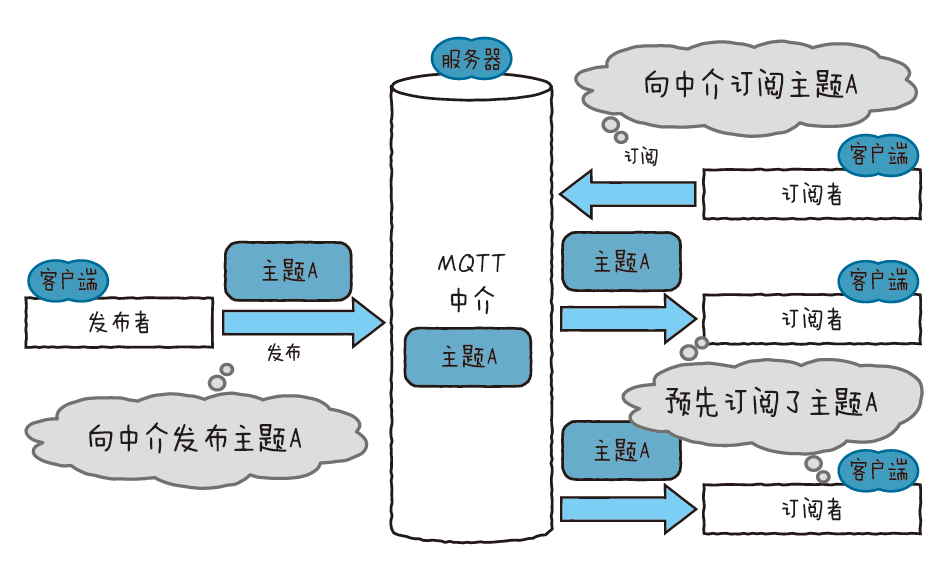
broker, publisher, subscriber
The broker acts as the server that forwards MQTT communication. Relatively speaking, the publisher and subscriber act as clients. The publisher is the client responsible for sending messages, and the subscriber is the client responsible for receiving messages. All messages exchanged by MQTT come with a “topic” address; each client treats this “topic” as a receiving address and performs the operation of transmitting messages to it. To use a vivid analogy, the broker is the mailbox that receives mail.
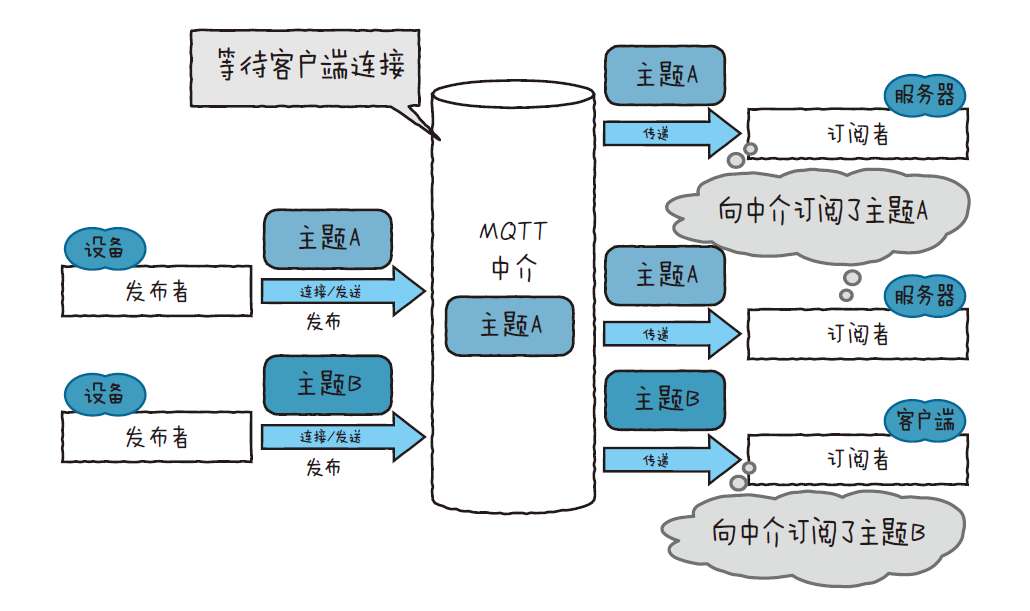
The mechanism of MQTT communication
The broker waits for each client to connect to it. The subscriber connects to the broker and tells the broker the topic name it wants to subscribe to. This is called subscribing. Then the publisher connects to the broker and sends a message with the topic as the receiving address. This is publishing. Once the publisher publishes a topic, the broker passes the message to the subscribers who have subscribed to that topic.
As shown above, if a subscriber subscribes to topic A, then only when the publisher publishes topic A will the broker pass the message to the subscriber. The subscriber and broker are always in a connected state, while the publisher only needs to establish a connection when publishing; but if it needs to publish several times in a short period, it needs to keep the connection. Because the broker plays the role of forwarding messages, each client does not need to know the other’s IP address or other network receiving address. And because many clients can subscribe to the same topic, the publisher and subscriber have a one-to-many relationship. In the communication between a device and a server, the device is equivalent to the publisher, and the server is equivalent to the subscriber.
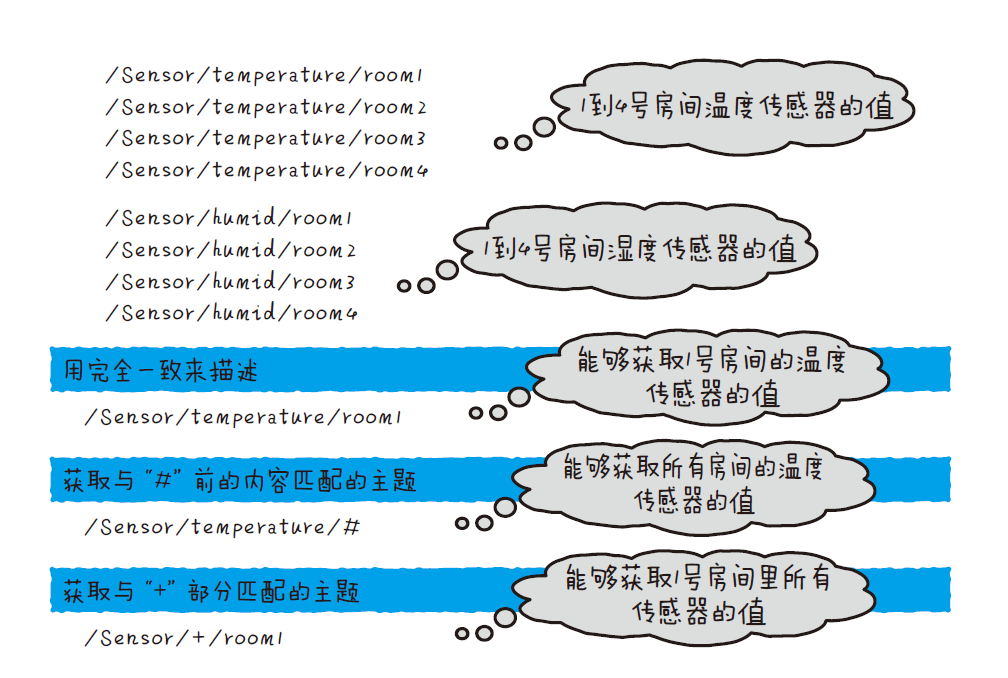
Example of MQTT topics
Topics use a hierarchical structure. Symbols such as “#” and “+” can specify many topics. As shown above, /Sensor/temperature/# uses the “#” symbol, so it specifies all topics starting with /Sensor/temperature/. In addition, /Sensor/+/room1 uses the symbol “+”, so it specifies all topics starting with /Sensor/ and ending with /room1.
The MQTT principle is reprinted from [Illustrated Internet of Things / by NTT DATA Group of Japan et al.; translated by Ding Ling. –Beijing: Posts & Telecom Press, 2017.4]
Introduction to IoT Platforms
The publish-subscribe messaging pattern requires a message broker server. The broker server is responsible for distributing messages to interested clients according to the message topic.
Hint
Currently there are a variety of MQTT IoT platforms on the Internet. You can select a suitable mqtt IoT platform according to your own requirements. I recommend the following several good IoT platforms.
OneNet China Mobile IoT platform: https://open.iot.10086.cn/
Advantages: supports many communication protocols, such as MQTT, HTTP, and more; editable application functions, allowing you to create page UI for data display and switch controls.
Disadvantages: the platform operation is more complex, and it is slightly different from the official MQTT, which is harder for beginners to understand.
DFRobot Easy IoT IoT platform: http://iot.dfrobot.com.cn/
Advantages: simple operation, suitable for beginners to learn.
Disadvantages: cannot customize topics; lacks application-side UI interface editing, unable to present data.
Adafruit IO IoT platform: https://io.adafruit.com/
Advantages: simple operation, suitable for MQTT teaching; has rich dashboard editing functions, which can present data well; supports IFTTT, which can associate many Internet services, with diverse gameplay.
Disadvantages: overseas server, unstable connection, often unable to connect.
In addition to the above, you can also set up your own mqtt server.
Connecting to the MQTT Broker Server
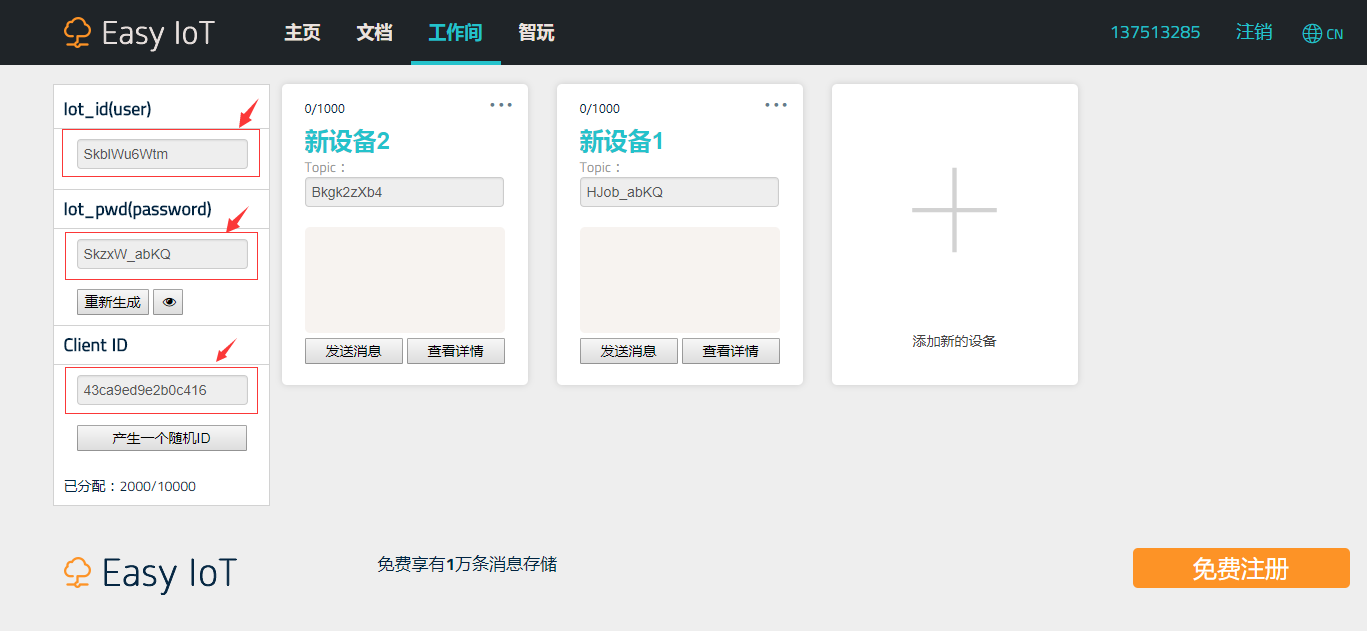
The following uses Easy IoT as an example to explain how to use mqtt to subscribe to topics and publish messages.
First import the required modules:
from umqtt.simple import MQTTClient    # Import the umqtt.simple module, for simple mqtt client functionality
from mpython import *                  # Import the mpython module
The mPython Board first connects to the Internet:
mywifi=wifi()                           # Instantiate the wifi class
mywifi.connectWiFi("ssid","password")   # Wi-Fi connection, ssid is the username, password is the password
Instantiate MQTTClient:
SERVER = "182.254.130.180"       # The MQTT server address of Easy IoT
username='yourIotUserName'       # Your Iot_id on Easy IoT
password='yourIotPassword'       # Your Iot_pwd on Easy IoT
CLIENT_ID = "yourClientID"       # Your Client ID on Easy IoT

c = MQTTClient(CLIENT_ID, SERVER,1883,username,password)  # MQTTClient class instance
c.connect()         # mqtt connection
MQTTClient(client_id, server, port=0, user=None, password=None, keepalive=0). The client_id parameter is the mqtt client’s unique id; the server parameter is the mqtt broker server’s
IP address; the port parameter is the mqtt server access port number, generally 1883, and different platforms have different ports; the user parameter is the username used to obtain mqtt authentication; the password parameter is the password used to obtain mqtt authentication;
the keepalive parameter is the connection keep-alive time; if no subscribe or publish packets are sent within the keepalive interval, the connection will be automatically disconnected.
Publishing Messages
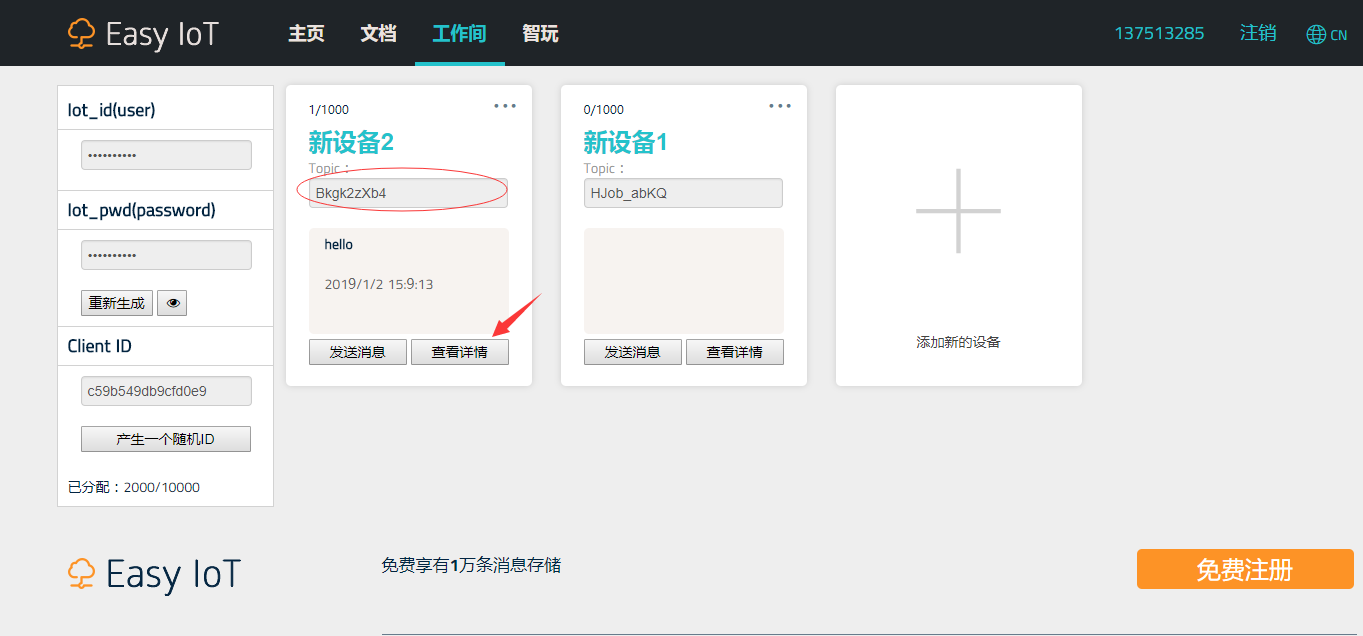
Publish a device topic on Easy IoT:
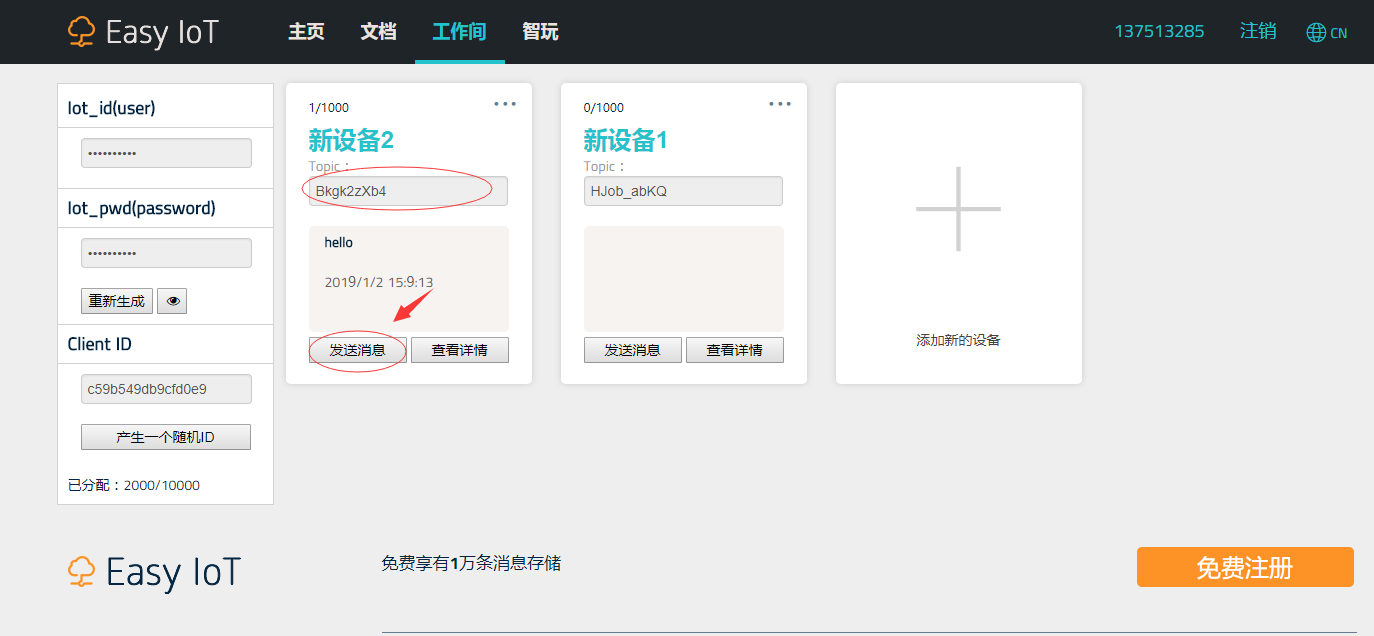
c.publish("Bkgk2zXb4",'hello')
Note
publish(topic, msg), the topic parameter is the topic to publish. On Easy IoT’s management interface, devices are distinguished by topic, and it cannot be modified, which needs attention; the msg parameter is the message of that topic;
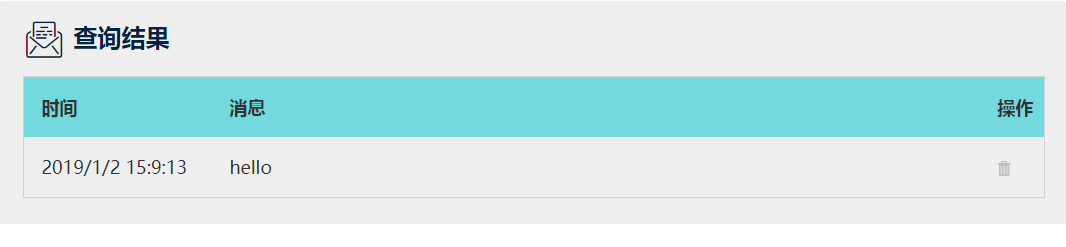
After publishing, you can query the message just published in the device’s “View Details” in the Easy IoT workspace, as follows:
Subscribing to Topics
Set it to print output after receiving a message:
def sub_cb(topic, msg):
        print((topic, msg))

c.set_callback(sub_cb)
Before subscribing to a topic, you need to first set the callback function set_callback(sub_cb). sub_cb is the function to handle the message after receiving it, and must contain two parameters.
Subscribe to a topic, the topic parameter is the topic to subscribe to:
c.subscribe(topic)
Finally use wait_msg() to wait for receiving messages:
while True:
        c.wait_msg()
Remote Light Switch
The following example uses the mqtt subscribe topic function to make a remote light switch:
from umqtt.simple import MQTTClient
from mpython import *
from machine import Timer

SERVER = "182.254.130.180"            # The MQTT server address of Easy IoT
username='yourIotUserName'            # Your Iot_id on Easy IoT
password='yourIotPassword'            # Your Iot_pwd on Easy IoT
CLIENT_ID = "yourClientID"            # Your Client ID on Easy IoT

TOPIC='yourTopic'                     # Your device's topic on Easy IoT

mywifi=wifi()                         # Instantiate the wifi class
mywifi.connectWiFi("ssid","password")   # Wi-Fi connection, ssid is the username, password is the password

try:
    def sub_cb(topic, msg):             # Callback function when a subscribed message is received
        print((topic, msg))             # Print the received topic message

        if topic == TOPIC.encode():     # If topic is our device's topic, since what is received is a bytes type, we need to convert TOPIC to bytes type here.

            if msg == b"on":                # If the message is "on", turn on the light
                    rgb.fill((0,20,0))
                    rgb.write()

            elif msg == b"off":         # If the message is "off", turn off the light
                rgb.fill((0,0,0))
                rgb.write()

    c = MQTTClient(CLIENT_ID, SERVER,1883,username,password,keepalive=30)   # MQTTClient class instance, and set the connection keep-alive interval to 30 seconds
    c.connect()                             # mqtt connection
    c.set_callback(sub_cb)                  # Set the callback function
    c.subscribe(TOPIC)                      # Subscribe to the topic
    print("Connected to %s" % SERVER)

    tim1 = Timer(1)                          # Create timer 1
    tim1.init(period=20000, mode=Timer.PERIODIC,callback=lambda n:c.ping())     # Send Ping at a 20-second interval to keep the connection

    while True:
        c.wait_msg()                    # Loop waiting for messages
finally:
    c.disconnect()                     # Disconnect the mqtt connection on exception
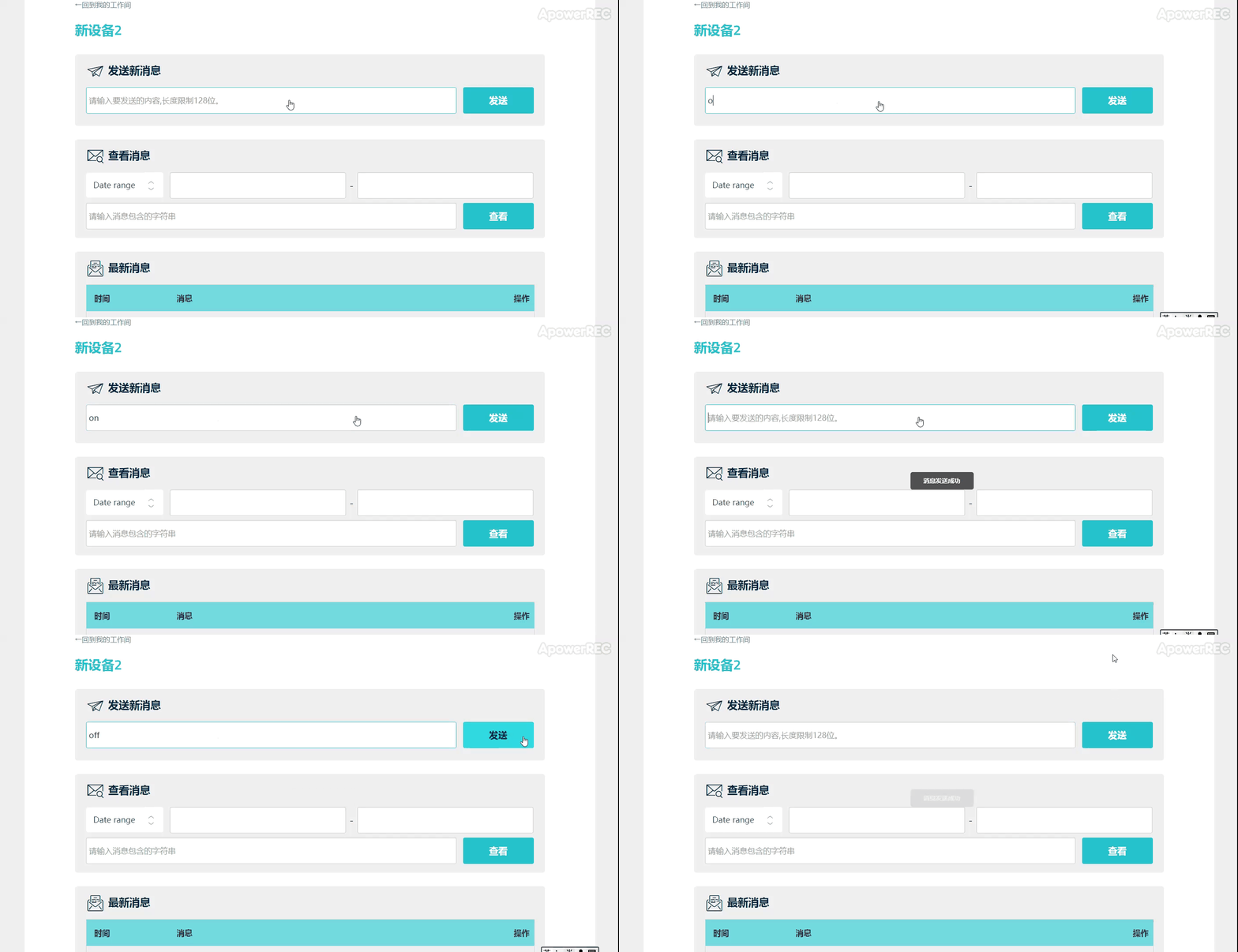
Then click to enter the device’s “Send Messages” in the Easy IoT workspace, send the topic message, as follows: