Wi-Fi
Overview
Introduces the basic usage of its Wi-Fi features.
Wi-Fi Working Modes
The mPython Board 3.0 supports 2.4 GHz Wi-Fi
Station mode (STA) - Connects to a wireless access point (AP)
SoftAP mode - Acts as an access point for other devices to connect to
Station Mode
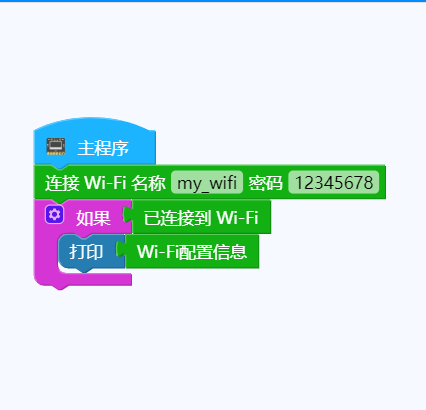
from mpython import *
import network

my_wifi = wifi()

my_wifi.connectWiFi("my_wifi", "12345678")

if my_wifi.sta.isconnected():
    print(my_wifi.sta.ifconfig())
SoftAP Hotspot Mode
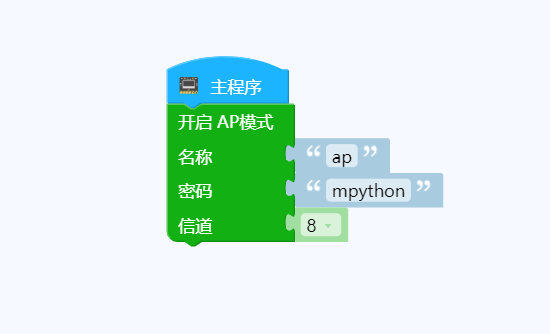
from mpython import *

import network

my_wifi = wifi()
my_wifi.enable_APWiFi('ap', 'mpython', channel=8)
API Reference
Main Wi-Fi APIs
wifi.connectWiFi("ssid, "psd")- Connect to Wi-Fiwifi.disconnectWiFi()- Disconnectwifi.sta.isconnected()- Check whether the connection succeededwifi.sta.ifconfig()- Get the Wi-Fi configurationwifi.enable_APWiFi('ssid', 'psd', channel=)- Enable SoftAP modewifi.disable_APWiFi()- Disable SoftAP mode
FAQ
- Q: Unable to connect to the AP
Check whether the SSID and password are correct
Check whether the Wi-Fi network is on the 2.4 GHz band
Check the router settings
Check the signal strength
- Q: The SoftAP cannot be found in scans
Check whether the correct channel is set
Check whether the maximum number of connections is set reasonably