Buttons

There are two press buttons, A and B, on the upper edge of the mPython Board. A pressed button reads low level; otherwise it reads high level.

The process of pressing buttons A and B on the mPython Board is described below. When a button is pressed, the level changes from high to low; the instant when the high level (1) changes to the low level (0) is called the falling edge. When the button is released, the level changes from low to high; the instant when the low level (0) changes to the high level (1) is called the rising edge. We can get the current button state by detecting the level change.
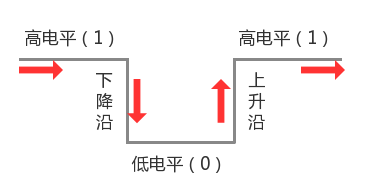
../../../../../_images/falling1.png

Get the Button State

Example - press A to turn the LED on, press B to turn it off
 1from mpython import *
 2
 3while True:
 4    # Button A pressed is low level
 5    if button_a.value() == 0 :    
 6        # Button debounce delay
 7        sleep_ms(20)
 8        # Check again if pressed
 9        if button_a.value()==0:
10            # Set to red
11            rgb[0] = (255,0,0)  
12            rgb[1] = (255,0,0)
13            rgb[2] = (255,0,0)
14        rgb.write()
15    # Button B pressed is low level
16    if button_b.value() == 0 :    
17        # Button debounce delay
18        sleep_ms(20)
19        # Check again if pressed
20        if button_b.value()==0:
21            # LED off
22            rgb[0] = (0, 0, 0)    
23            rgb[1] = (0, 0, 0)
24            rgb[2] = (0, 0, 0)
25            rgb.write()

Before use, import the mpython module:

from mpython import *

Buttons A and B pressed:

button_a.value() == 0      # Button A pressed
button_b.value() == 0      # Button B pressed

Note

button_a is the object name of button A, and button B is named button_b. They are derived classes of machine.Pin and inherit the Pin methods, so the value function can be used to read the pin value: it returns 1 for a high-level signal and 0 for a low-level signal. Therefore, value==1 when the button is not pressed, and value==0 when it is pressed.

Button Interrupts

What is an interrupt?

While a program is running, a situation arises that the CPU must handle immediately; the process in which the CPU temporarily suspends program execution to handle this new situation is called an interrupt. When needed, the CPU must pause what it is doing, handle something else, and then go back to the paused work after finishing.

Example - press button A to turn on the onboard LED and buzzer, press button B to turn them off
 1from mpython import *     #Import mpython module
 2import music              #Import music module
 3
 4def ledon(_):             #Define interrupt handler: LED on and buzzer
 5    rgb.fill((128,0,0))   #Turn on onboard LEDs, all set to red, half brightness
 6    rgb.write()           #Output color to LEDs
 7    music.pitch(1000)     #Turn on buzzer: 1000Hz
 8
 9def ledoff(_):            #Define interrupt handler: LED off and buzzer
10    rgb.fill((0,0,0))     #Turn off all onboard LEDs
11    rgb.write()           #Output color to LEDs
12    music.pitch(0)        #Turn off buzzer
13
14button_a.irq(trigger=Pin.IRQ_FALLING, handler=ledon)     #Set Button A interrupt, falling edge trigger, LED on and buzzer
15
16button_b.irq(trigger=Pin.IRQ_FALLING, handler=ledoff)    #Set Button B interrupt, falling edge trigger, LED off and buzzer
17
18while True:                            #Program runs in loop when no interrupt
19    pass

Note

In the program above, by default the program waits idly in the loop without executing any instruction. When an interrupt of button A or B is detected, the corresponding function is called back.

button_a.irq(trigger=Pin.IRQ_FALLING, handler=ledon) invokes the function corresponding to the interrupt handler. trigger configures the event that can trigger the interrupt; the possible values are: Pin.IRQ_FALLING falling-edge interrupt; Pin.IRQ_RISING rising-edge interrupt; Pin.IRQ_LOW_LEVEL low-level interrupt; Pin.IRQ_HIGH_LEVEL high-level interrupt. handler is an optional function that is called when the interrupt is triggered, returning a callback object. For detailed usage, see button_[a,b].irq.

Attention

When defining an interrupt handler function, the function must contain one arbitrary parameter, otherwise it cannot be used. The parameter in the ledon() and ledoff() functions is _.