bme280
The BME280 is an environmental sensor integrating temperature, humidity and pressure, a three-in-one. It features high precision, multiple functions, and small size. This sensor is very suitable for various weather/environmental sensing. Its precision is ±3%, with an absolute pressure accuracy of ±1 hPa and a temperature accuracy of ±1.0°C. Since pressure varies with altitude, the pressure measurement results are very good, and you can also use it as an altimeter with an accuracy of ±1 meter or better!
Important
The mPython Board reserves a position for the BME280 chip that is not populated; the default configured mPython Board does not come with the BME280 environmental sensor. If your mPython Board does not have the BME280 chip, you can use a BME280 module and connect it to the I2C pins and join the bus through an expansion board, i.e. P19(SCL) and P20(SDA).
Getting Temperature, Humidity and Pressure
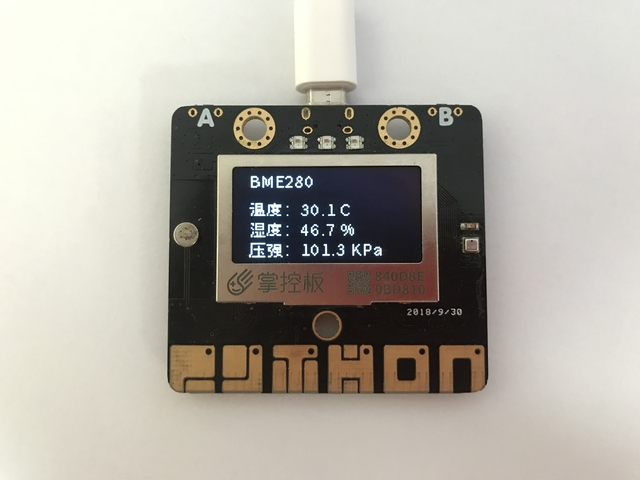
Example of getting the bme280 temperature, humidity and pressure and displaying them on the OLED screen:
from mpython import *              # Import the mpython module

while True:
    oled.fill(0)                   # Clear the screen
    oled.DispChar("BME280",10,0)
    oled.DispChar("Temp:%0.1f C" % bme280.temperature(),10,20)   # Get the bme280 temperature, unit Celsius
    oled.DispChar("Humi:%0.1f %%" % bme280.humidity(),10,34)     # Get the bme280 humidity, unit %
    oled.DispChar("Pres:%0.1f KPa" % (bme280.pressure()/1000),10,48)  # Get the bme280 pressure, unit Pa; here we divide by 1000 to convert to KPa for display
    oled.show()   # Refresh the screen
    sleep(2)      # Delay 2 seconds
The BME280 class has already been instantiated within mpython, so you can directly use the bme280 object. To get the temperature value, use the temperature() function, in units of Celsius. To get the humidity value, use
humidity(), in units of %. To get the atmospheric pressure, use pressure(), in units of Pa (pascal).
Extended Applications
Now you have learned how to get the meteorological data of the BME280. Thinking further, how can you make use of the meteorological data and how can you send it to a remote location? You can combine the http Server you learned earlier for remote access, or use the mqtt protocol to push the data to a server.