Fetching Network Weather
Example: Fetch weather information over the network and feed the weather information back to the OLED screen.
from mpython import*
import json
import urequests                    # Module for network access
from seniverse import *             # Weather icon module
from machine import Timer           # Timer module

API_KEY = 'yourkey'                 # Seniverse weather API key

url_now="https://api.seniverse.com/v3/weather/now.json"           # Request address for getting current weather
url_daily="https://api.seniverse.com/v3/weather/daily.json"       # Request address for getting multi-day weather forecast

oled.DispChar('Connecting...',40,25)     # OLED screen displays the network connection prompt
oled.show()

mywifi=wifi()
mywifi.connectWiFi('yourESSID','yourpassword')          # Connect to the Wi-Fi network

def nowWeather(apikey,location='ip',language='zh-Hans',unit='c'):         # Set the data returned for current weather
    nowResult = urequests.get(url_now, params={
        'key': apikey,
        'location': location,
        'language': language,
        'unit': unit
    })
    json=nowResult.json()
    nowResult.close()
    return json

def dailyWeather(apikey,location='ip',language='zh-Hans',unit='c',start='0',days='5'):        # Set multi-day weather, only returning today's data
    dailyResult = urequests.get(url_daily, params={
        'key': apikey,
        'location': location,
        'language': language,
        'start': start,
        'days': days
    })
    json=dailyResult.json()
    dailyResult.close()
    return  json


def refresh():
    nowRsp=nowWeather(API_KEY)                 # Get current weather via the API key
    dailyRsp=dailyWeather(API_KEY)             # Get multi-day weather forecast via the API key

    today=dailyRsp['results'][0]['daily'][0]['date'][-5:]         # Current date, displaying "month-day"
    todayHigh=dailyRsp['results'][0]['daily'][0]['high']          # Highest temperature
    todaylow=dailyRsp['results'][0]['daily'][0]['low']            # Lowest temperature

    nowText=nowRsp['results'][0]['now']['text']                   # Weather phenomenon text
    nowTemper=nowRsp['results'][0]['now']['temperature']          # Temperature
    todayIco=nowRsp['results'][0]['now']['code']                  # Weather phenomenon icon
    city=nowRsp['results'][0]['location']['name']                 # Geographic location

    oled.fill(0)
    oled.bitmap(10,23,ico[todayIco],38,38,1)                   # Display the current weather phenomenon icon
    oled.DispChar("%s,Now" %city,0,0)
    oled.DispChar(today,90,0)
    oled.DispChar("%s℃/%s" %(nowTemper,nowText),70,25)        # Display the current temperature
    oled.DispChar("%s~%s℃" %(todaylow,todayHigh),70,45)       # Display today's lowest and highest temperatures
    oled.show()

refresh()          # Data update

tim1 = Timer(1)
tim1.init(period=1800000, mode=Timer.PERIODIC,callback=lambda _:refresh())      # Timed, refresh once every half hour
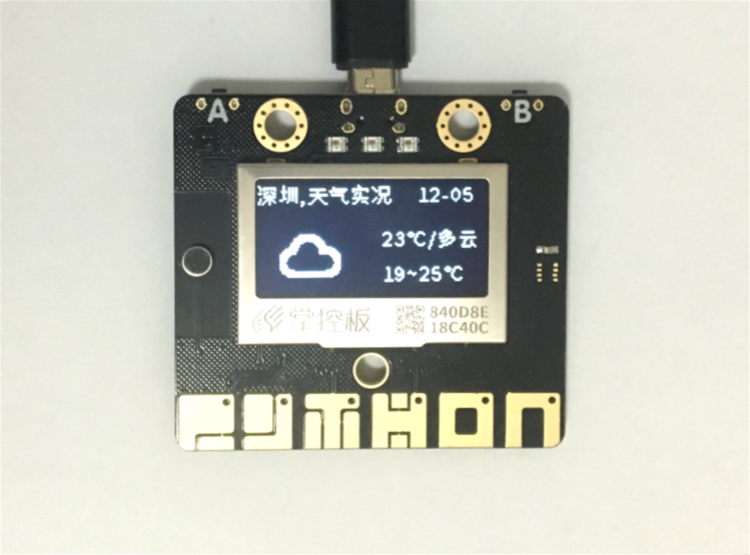
Before use, import the mpython, json, urequests, Timer and weather icon seniverse modules (import the seniverse module file into the mPython Board’s file root directory):
from mpython import*
import json
import urequests
from seniverse import *
from machine import Timer
To use Seniverse’s free weather API, you must first register an account on the Seniverse website, and you will get an API key. The API key is a unique string used to verify the legitimacy of an API request, passed in through the key parameter in the API request:
API_KEY = 'yourkey'
Add the request addresses for current weather and multi-day weather forecast (for more requests, refer to the weather data options provided on the Seniverse website):
url_now="https://api.seniverse.com/v3/weather/now.json"           # Request address for getting current weather
url_daily="https://api.seniverse.com/v3/weather/daily.json"       # Request address for getting multi-day weather forecast
Connect to your Wi-Fi network; you need to set your Wi-Fi name and password:
mywifi=wifi()
mywifi.connectWiFi('yourESSID','yourpassword')
Define the results returned for current weather and multi-day weather forecast:
def nowWeather(apikey,location='ip',language='zh-Hans',unit='c'):
    nowResult = urequests.get(url_now, params={
        'key': apikey,
        'location': location,
        'language': language,
        'unit': unit
    })
    return nowResult.json()

def dailyWeather(apikey,location='ip',language='zh-Hans',unit='c',start='0',days='5'):
    dailyResult = urequests.get(url_daily, params={
        'key': apikey,
        'location': location,
        'language': language,
        'start': start,
        'days': days
    })
    return  dailyResult.json()
Note
Parameters: unit is the temperature unit, c is Celsius ℃. start is the starting time, such as -2 the day before yesterday, -1 yesterday, 0 today, 1 tomorrow. days is the number of days, returning the results for days days counted from start. For more parameters, refer to the Seniverse website.
https://www.seniverse.com/doc
Selectively output all the returned results. A tuple can use subscript indexing to access the values in the tuple:
today=dailyRsp['results'][0]['daily'][0]['date'][-5:]         # Current date, displaying "month-day"
todayHigh=dailyRsp['results'][0]['daily'][0]['high']          # Highest temperature
todaylow=dailyRsp['results'][0]['daily'][0]['low']            # Lowest temperature

nowText=nowRsp['results'][0]['now']['text']                   # Weather phenomenon text
nowTemper=nowRsp['results'][0]['now']['temperature']          # Temperature
todayIco=nowRsp['results'][0]['now']['code']                  # Weather phenomenon icon
city=nowRsp['results'][0]['location']['name']                 # Geographic location
Note
For the specific usage of tuples, refer to Python’s tuples.