Socket - TCP
What is a socket?
Socket is an abstract concept in network programming. We usually use a Socket to represent “a network connection has been opened”, and opening a Socket requires knowing the target computer’s IP address and port number, and then specifying the protocol type.
Introduction to the TCP Protocol
The TCP protocol, Transmission Control Protocol (abbreviated as TCP), is a connection-oriented, reliable, byte-stream-based transport layer communication protocol, defined by IETF’s RFC 793.
TCP communication goes through three steps: creating a connection, data transfer, and terminating the connection. In the TCP communication model, before communication begins, the relevant connection must be created first before data can be sent, similar to “making a phone call” in daily life.
When working, a socket divides the two communicating parties into the server side and the client side, i.e. the C/S model. The TCP communication principle is shown below:
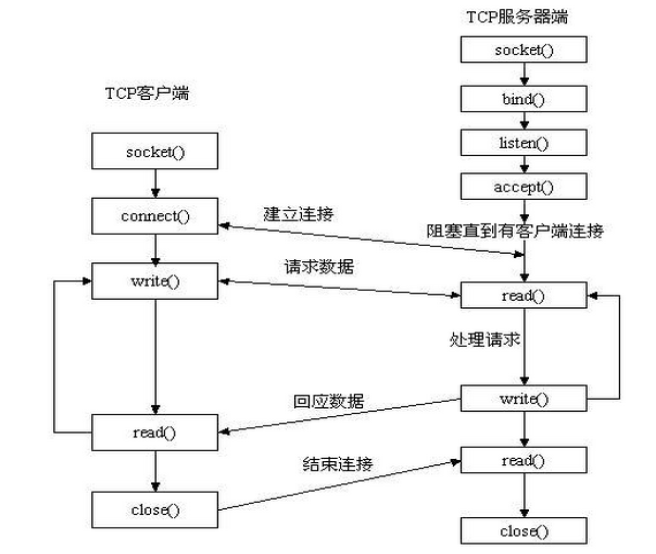
Socket TCP communication process
TCP Programming
This part of the tutorial introduces how to use TCP sockets as a client or a server. For a more comprehensive use of the socket module, please refer to the usocket module.
The following tutorial requires a TCP network debugging tool. Below we use Network Test Utility for iOS, which can be searched and installed on the App Store; for Android, please click to download.
Note: here the TCP client (tcpClient) is your computer or phone, and the TCP server (tcpServer) is the mPython Board.
TCP Client
The general steps for the client side of TCP programming are:
Create a socket, using the socket() function
Set socket attributes, using the setsockopt() function, optional
Bind the IP address, port and other information to the socket, using the bind() function, optional
Set the IP address and port and other attributes of the party to connect to
Connect to the server, using the connect() function
Send and receive data, using the send() and recv() functions, or read() and write()
Close the network connection
 1import socket
 2from mpython import *
 3
 4host = "172.25.1.63"          # TCP server IP address
 5port = 5001                   # TCP server port
 6s=None
 7
 8mywifi=wifi()                 # Create wifi class
 9
10
11# Catch exception, if unexpectedly interrupted in "try" block, stop and close socket
12try:
13    mywifi.connectWiFi("ssid","password")                   # Wi-Fi connection, set SSID and password
14    # mywifi.enable_APWiFi("wifi_name",13)                  # Can also enable AP mode to create own Wi-Fi network
15    ip=mywifi.sta.ifconfig()[0]                             # Get local IP address
16    s = socket.socket(socket.AF_INET, socket.SOCK_STREAM)   # Create TCP socket, parameters optional. Default is TCP
17    s.setsockopt(socket.SOL_SOCKET, socket.SO_REUSEADDR, 1) # Set socket options
18    s.connect((host,port))                                  # Set server IP and port to connect, then connect
19    s.send("hello mPython,I am TCP Client")                 # Send data to server
20
21    while True:
22        data = s.recv(1024)                                 # Read 1024 bytes from server socket
23        if(len(data) == 0):                                 # If received data is 0 bytes, close socket
24            print("close socket")
25            s.close()
26            break
27        print(data)
28        data=data.decode('utf-8')                         # Decode string with UTF-8 encoding
29        oled.fill(0)                                      # Clear screen
30        oled.DispChar(data,0,0)                           # Display received socket data on OLED
31        oled.show()                                       # Display
32        s.send(data)                                      # Send received data back to server
33
34# On exception, close socket and network
35except:
36    if (s):
37        s.close()
38    mywifi.disconnectWiFi()
Attention
Since data is transmitted in bytes form over the network, attention must be paid to data encoding and decoding.
Attention
In the above example, connectWiFi() is used to connect to the same router’s Wi-Fi. You can also use enable_APWiFi() to enable AP mode and build your own Wi-Fi network for other devices to connect to.
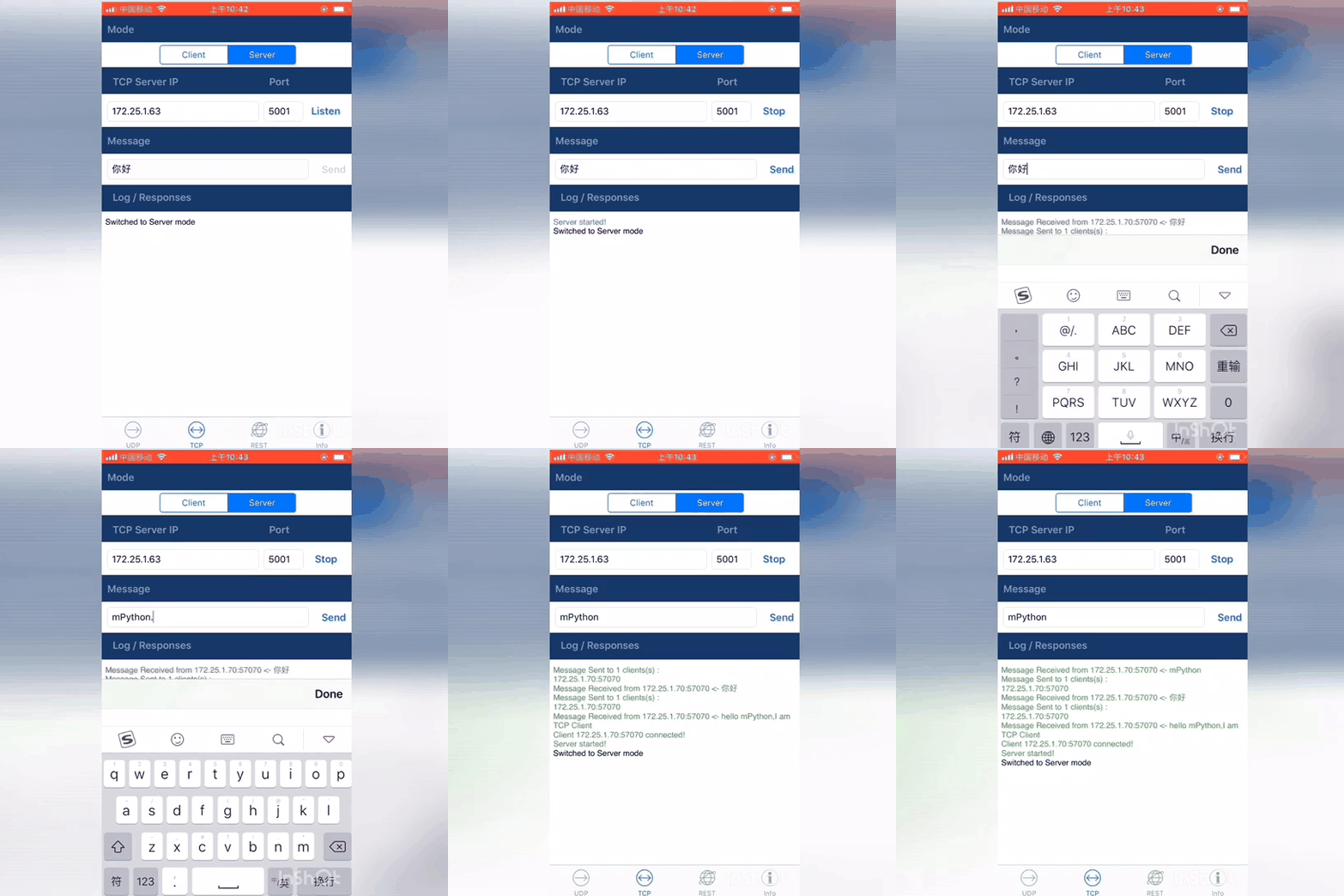
First, the mPython Board and the phone must be connected to the same local area network. Open Network Test Utility, enter the “TCP Server” interface,
select the phone’s IP address within that network for the TCP Server IP, and the port number can be set in the range 0~65535. Then click Listen to start listening on the port.
Set the TCP server IP address host and port number port selected above in the program, and restart and run the program.
After successfully connecting to the Server, the TCP Server will receive the text hello mPython,I am TCP Client sent by the Client. At this point, when you send text from the TCP Server to the Client, the mPython Board will
receive the text and display it on the OLED screen.
TCP Server
The general steps for the server side of TCP programming are:
Create a socket, using the socket() function
Set socket attributes, using the setsockopt() function, optional
Bind the IP address, port and other information to the socket, using the bind() function
Start listening and set the maximum number of listeners, using the listen() function
Wait for a client to request a connection, using the accept() function
Send and receive data, using the send() and recv() functions, or read() and write()
Close the network connection
tcpServer example:
 1import socket
 2from mpython import *
 3
 4port=5001                   # TCP server port,range0~65535
 5listenSocket=None
 6
 7mywifi=wifi()               # Create wifi class
 8
 9# Catch exception, if unexpectedly interrupted in "try" block, stop and close socket
10try:
11    mywifi.connectWiFi("ssid","password")                                   # Wi-Fi connection, set SSID and password
12    # mywifi.enable_APWiFi("wifi_name",13)                                  # Can also enable AP mode to create own Wi-Fi network
13    ip= mywifi.sta.ifconfig()[0]                                            # Get local IP address
14    listenSocket = socket.socket(socket.AF_INET, socket.SOCK_STREAM)        # Create socket, default is TCP if no parameters given
15    listenSocket.setsockopt(socket.SOL_SOCKET, socket.SO_REUSEADDR, 1)      # Set socket option parameters
16    listenSocket.bind((ip,port))                                            # Bind IP and port
17    listenSocket.listen(3)                                                  # Start listening and set max connections
18    print ('tcp waiting...')
19    oled.DispChar("%s:%s" %(ip,port),0,0)                                   # Display local server IP and port on OLED
20    oled.DispChar('accepting.....',0,16)
21    oled.show()
22
23    while True:
24        print("accepting.....")
25        conn,addr = listenSocket.accept()                                   # Blocking wait for client connection. Returns a new socket dedicated to this client
26        print(addr,"connected")
27
28        while True:
29            data = conn.recv(1024)                                          # Receive data from peer, read up to 1024 bytes
30            if(len(data) == 0):
31                print("close socket")
32                conn.close()                                                # If received data is 0 bytes, close socket
33                break
34            data_utf=data.decode()                                          # Decode received byte stream with UTF-8
35            print(data_utf)
36            oled.DispChar(data_utf,0,48)                                    # Display received text on OLED
37            oled.show()
38            oled.fill_rect(0,48,128,16,0)                                   # Partial clear screen
39            conn.send(data)                                                 # Send data back to client
40
41# On exception, close socket and network
42except:
43    if(listenSocket):
44        listenSocket.close()
45    mywifi.disconnectWiFi()
Attention
In the above example, connectWiFi() is used to connect to the same router’s Wi-Fi. You can also use enable_APWiFi() to enable AP mode and build your own Wi-Fi network for other devices to connect to.
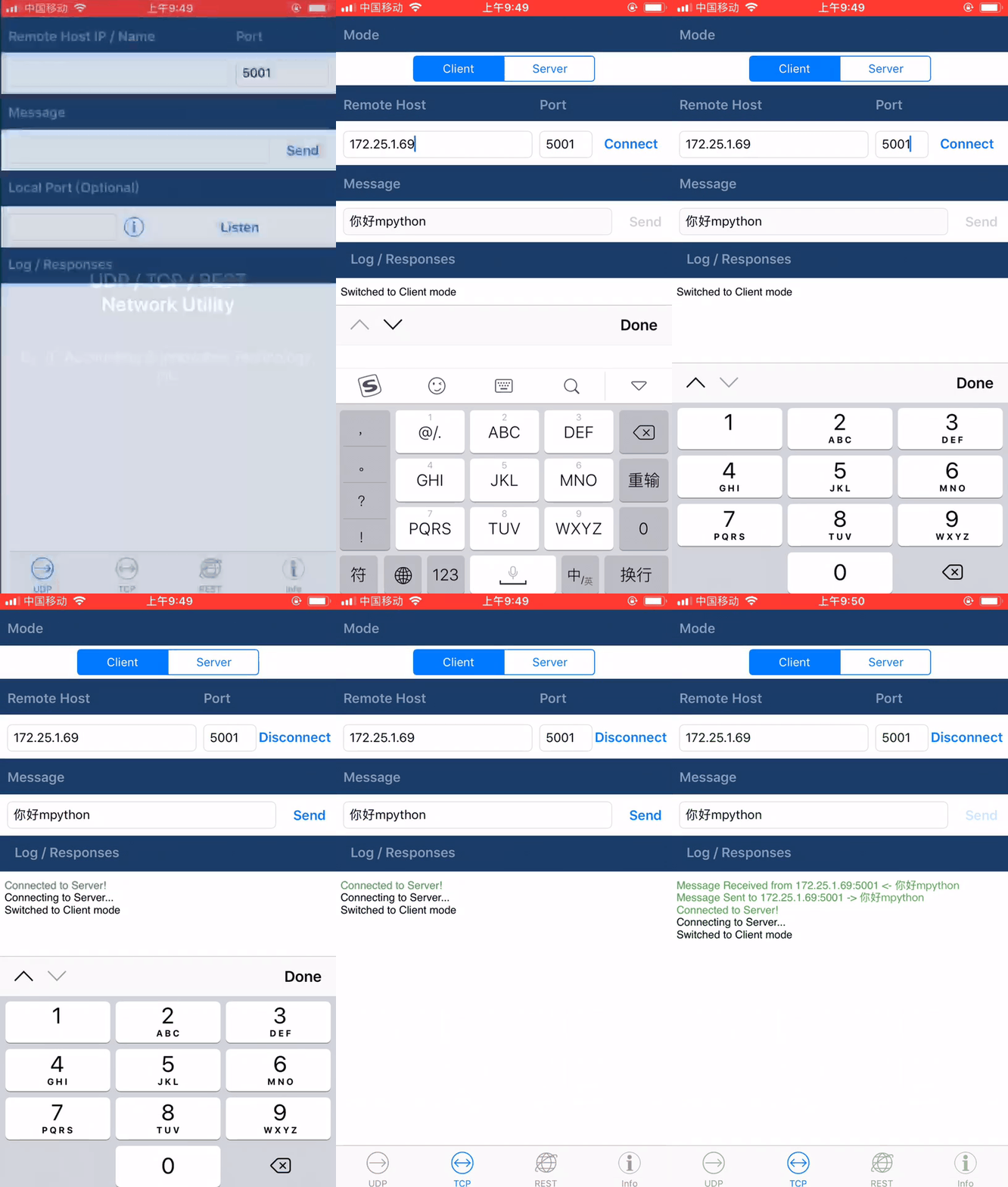
First, the mPython Board and the phone must be connected to the same local area network. The mPython Board restarts and runs the program, and the TCP Server side waits for the Client side’s connection request. Open Network Test Utility, enter the “TCP Client” interface, fill in Remote host and port, i.e. the IP address and port of socket.blind(ip,port)
. After the Connect connection succeeds, send text; the mPython Board receives the text, displays it on the OLED screen, and returns it to the TCP Client side. You can see the Client->Server, Server->Client process of the text on the phone’s receiving interface.