Parsing JSON
JSON (JavaScript Object Notation) is a lightweight data interchange format. It uses a text format completely independent of programming languages to store and represent data. It is easy for humans to read and write, and also easy for machines to parse and generate, so it is widely used in Internet applications.
In Python, json and dict are very similar; both are in key-value form, and json and dict can also be very conveniently converted to each other through the json module.
json: a data format, which is a pure string. In essence it is a way of organizing files, such as the txt, csv, doc, docx, xls, xlsx files you are familiar with.
dict: a data structure, such as list, set, str, array.
Fetching and Parsing JSON over the Network
The HTTP protocol uses a request/response model: the browser or client sends a request, and the server gives a response.
For example, to obtain information such as the IP address from the open interface http://ip-api.com/json/, we enter the address directly in the browser and can see:
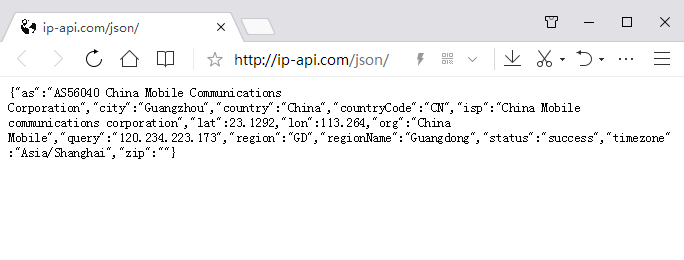
This is a json array containing information such as the IP address. By accessing this url, we obtain this information and then return the string text; through ujson.loads(str) the string is generated into a dict dictionary type, so we can directly read the key to get the corresponding value.
 1from mpython import*
 2import json
 3import urequests           # urequests module is for network access
 4
 5mywifi=wifi()
 6mywifi.connectWiFi('yourESSID', 'yourpassword')    #Connect to Wi-Fi network
 7
 8url_ip ="http://ip-api.com/json/"                  #Add request URL
 9
10rsp=urequests.get(url_ip)                          #Send GET request
11
12ipJson=rsp.text
13
14ipDict=json.loads(ipJson)
15
16oled.DispChar('Country:%s' % ipDict['country'],0,5)     #Display country info on OLED
17oled.show()
18
19oled.DispChar('City:%s' % ipDict['city'],0,25)       #Display city info on OLED
20oled.show()
21
22oled.DispChar('IP:%s' % ipDict['query'],0,45)        #Display IP address info on OLED
23oled.show()
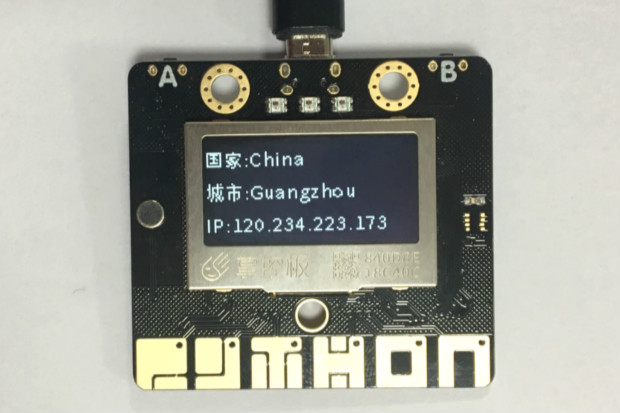
We can parse step by step in the REPL interactive programming environment to view the results more intuitively.
Before use, import the mpython, json, and urequests modules:
>>> from mpython import*
>>> import json
>>> import urequests
Connect to your Wi-Fi network; you need to set your Wi-Fi name and password:
>>> mywifi=wifi()
>>> mywifi.connectWiFi('yourESSID', 'yourpassword')
Connecting to network...
Connecting to network...
Connecting to network...
WiFi Connection Successful,Network Config:('','','','')
Add the request address, send a get request, and obtain the data returned by the third-party interface of the web page:
>>> url_ip ="http://ip-api.com/json/"
>>> rsp=urequests.get(url_ip)
The obtained data is returned in json data text format. Print it out and we can see the returned data:
>>> ipJson=rsp.text
>>> print(jpJson)
{"as":"AS56040 China Mobile Communications Corporation","city":"Guangzhou","country":"China","countryCode":"CN","isp":"China Mobile communications corporation","lat":23.1292,"lon":113.264,"org":"China Mobile","query":"120.234.223.173","region":"GD","regionName":"Guangdong","status":"success","timezone":"Asia/Shanghai","zip":""}
Note
rsp.text returns data in json text format.
Convert the obtained data to a dict dictionary type. Print it out and we can see the returned data:
>>> ipDict=json.loads(ipJson)
>>> print(ipDict)
{'countryCode': 'CN', 'lon': 113.264, 'regionName': 'Guangdong', 'query': '120.234.223.173', 'city': 'Guangzhou', 'status': 'success', 'org': 'China Mobile', 'timezone': 'Asia/Shanghai', 'region': 'GD', 'lat': 23.1292, 'isp': 'China Mobile communications corporation', 'as': 'AS56040 China Mobile Communications Corporation', 'zip': '', 'country': 'China'}
Note
json.loads(str) parses a JSON string and returns an object.
We can type a key in the dict dictionary to get the corresponding information value, such as the city or IP address:
>>> ipDict['city']
'Guangzhou'
>>> ipDict['query']
'120.234.223.173'