Socket - UDP
Introduction to the UDP Protocol
UDP (User Datagram Protocol) is a connectionless, unreliable, datagram-based transport layer communication protocol.
Compared with TCP, the UDP communication process is simpler; it does not require the complex three-way handshake and four-way handshake, reflecting its connectionless nature. So UDP transmits faster than TCP, but it is prone to packet loss, has no guarantee of data arrival order, lacks congestion control, and follows the principle of best-effort delivery, reflecting its unreliability.
The figure below explains the interaction process of UDP communication connection between the server and the client:
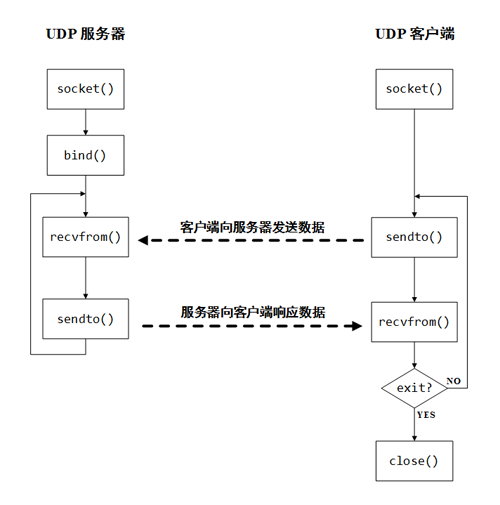
Socket UDP communication process
UDP Programming
Usually when we talk about network programming, we mean TCP programming by default, i.e. communicating using the TCP method mentioned in the previous chapter. When the socket function creates a socket object without given parameters, it defaults to SOCK_STREAM, i.e. socket(socket.AF_INET, socket.SOCK_STREAM), which means creating a socket for stream-based network communication.
SOCK_STREAM is connection-oriented, i.e. a connection must be created through connect before each send and receive of data. It is also bidirectional, i.e. either party can send and receive data. The protocol itself provides some guarantee mechanisms to ensure that it is reliable and ordered, i.e. each packet arrives at the receiver in the order it was sent.
SOCK_DGRAM is network communication of the User Datagram Protocol. It is connectionless and unreliable, because after the communicating parties send data, they do not know whether the other party has received the data, or received it normally.
Either party can use sendto to send data after creating a socket, and can also use recvfrom to receive data. It does not care at all whether the other party exists or has sent data. Its characteristic is that the communication speed is relatively fast. Everyone knows TCP requires a three-way handshake, while UDP does not.
UDP Client
The general steps for the client side of UDP programming are:
Create a UDP socket, using the socket(socket.AF_INET, socket.SOCK_DGRAM) function
Set socket attributes, using the
setsockopt()function optionalBind the IP address, port and other information to the socket, using the
bind()function optionalSet the other party’s IP address and port and other attributes
Send data, using the
sendto()functionClose the network connection
UDP client example:
 1from mpython import *
 2import socket
 3
 4mywifi=wifi()                                           # Create a wifi object
 5mywifi.connectWiFi("ssid","password")                   # Connect to the network
 6dst = ("192.168.0.3", 6000)                             # Destination ip address and port number
 7
 8# Catch exceptions; if the "try" block is interrupted unexpectedly, stop and close the socket
 9try:
10    s = socket.socket(socket.AF_INET, socket.SOCK_DGRAM)               # Create a UDP socket
11    s.setsockopt(socket.SOL_SOCKET,socket.SO_REUSEADDR,1)              # Set the socket attributes
12
13    while True:
14        s.sendto(b'hello message from mPython\r\n',dst)                # Send data to the destination ip
15        sleep(2)
16
17# When an exception is caught, close the socket and network
18except:
19    if (s):
20        s.close()
21    mywifi.disconnectWiFi()
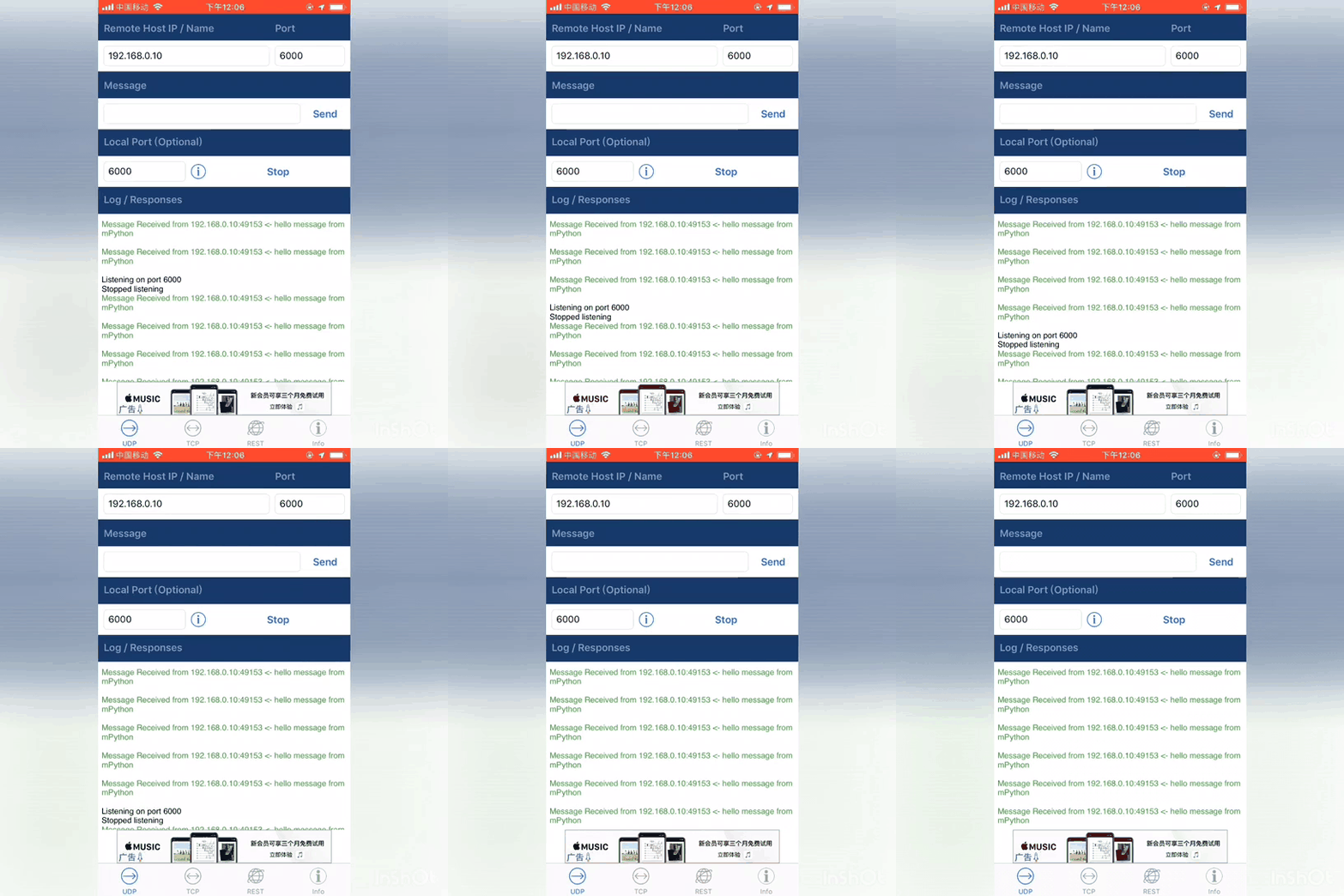
UDP Server
The general steps for the server side of UDP programming are:
Create a UDP socket, using the socket(socket.AF_INET, socket.SOCK_DGRAM) function
Set socket attributes, using the
setsockopt()function optionalBind the IP address, port and other information to the socket, using the
bind()functionReceive data in a loop, using the
recvfrom()functionClose the connection
 1from mpython import *
 2import socket
 3
 4mywifi=wifi()                                           # Create a wifi object
 5mywifi.connectWiFi("ssid","password")                   # Connect to the network
 6
 7# Catch exceptions; if the "try" block is interrupted unexpectedly, stop and close the socket
 8try:
 9    s = socket.socket(socket.AF_INET, socket.SOCK_DGRAM)               # Create a UDP socket
10    s.setsockopt(socket.SOL_SOCKET,socket.SO_REUSEADDR,1)              # Set the socket attributes
11    ip=mywifi.sta.ifconfig()[0]                                        # Get the local ip address
12    s.bind((ip,6000))                                                  # Bind the ip and port number
13    print('waiting...')
14    oled.DispChar("%s:6000" %ip,0,0)
15    oled.show()
16    while True:
17        data,addr=s.recvfrom(1024)                           # Receive data sent by the other party, read bytes set to 1024, returns a (data,addr) tuple
18        print('received:',data,'from',addr)                  # Print the received data
19        oled.fill(0)                                         # Clear the screen
20        oled.DispChar("%s" %data.decode(),0,15)              # Display the received content on the oled
21        oled.DispChar("from%s" %addr[0],0,31)
22        oled.show()
23
24
25# When an exception is caught, close the socket and network
26except:
27    if (s):
28        s.close()
29    mywifi.disconnectWiFi()
Note
The return value of the recvfrom() function is a two-tuple (bytes, address), where bytes is the received byte data, and address is the sender’s IP address and port number,
represented by the two-tuple (host, port). Note that the return value of the recv() function is only bytes data. Unlike TCP programming, UDP requires specifying the address information each time data is sent with sendto() and received with recvfrom; it does not need to call listen() and accept().
Attention
In the above example, connectWiFi() is used to connect to the same router’s Wi-Fi. You can also use enable_APWiFi() to enable AP mode and build your own Wi-Fi network for other devices to connect to. This way you do not need to rely on another router’s Wi-Fi network.