HTTP
HTTP is based on the client/server (C/S) architecture model, exchanges information through a reliable connection, and is a stateless request/response protocol.
An HTTP “client” is an application (a web browser or any other client) that sends one or more HTTP requests to a server by connecting to it.
HTTP GET request
The following example shows how to download a web page. HTTP uses port 80, and you first need to send a “GET” request to download any content. As part of the request, you need to specify the page to retrieve.
 1import socket
 2
 3# Define the http get function
 4def http_get(url):
 5    # Parse the url
 6    _, _, host, path = url.split('/', 3)
 7    # Resolve the website domain name into an IP address
 8    addr = socket.getaddrinfo(host, 80)[0][-1]
 9    # Build a socket
10    s = socket.socket()
11    # Connect to the IP address
12    s.connect(addr)
13    # Send in http get request format
14    s.send(bytes('GET /%s HTTP/1.0\r\nHost: %s\r\n\r\n' % (path, host), 'utf8'))
15    while True:
16        # socket receive
17        data = s.recv(100)
18        if data:
19            print(str(data, 'utf8'), end='')
20        else:
21            break
22    s.close()
23
24# Visit http://micropython.org/ks/test.html
25http_get('http://micropython.org/ks/test.html')
Hint
When using the socket module, please connect to Wi-Fi first and make sure you can access the Internet. For how to connect to Wi-Fi, see the previous chapter Configure Wi-Fi.
http_get('http://micropython.org/ks/test.html') sends a get request from the mPython Board client to the micropython.org server for the resource at the test path. After receiving the request, the server returns data to the client.
urequests module
The above uses socket to implement the HTTP get request. We can use the urequests module, which has already wrapped some common HTTP protocol request methods, making it simpler to use.
 1import urequests
 2from mpython import *
 3
 4my_wifi = wifi()
 5my_wifi.connectWiFi('ssid','psw')
 6
 7# http get method
 8r = urequests.get('http://micropython.org/ks/test.html')
 9# The response content
10r.content
For more usage of the urequests module, please refer to that module’s documentation.
HTTP Server
 1import socket
 2import network,time
 3from mpython import *
 4
 5# Instantiate the wifi class
 6mywifi=wifi()
 7# Wi-Fi connection, set ssid and password
 8mywifi.connectWiFi("ssid","psw")
 9
10
11def main():
12    s = socket.socket()
13    ai = socket.getaddrinfo(mywifi.sta.ifconfig()[0], 80)
14    print("Bind address info:", ai)
15    addr = ai[0][-1]
16    s.setsockopt(socket.SOL_SOCKET, socket.SO_REUSEADDR, 1)
17    s.bind(addr)
18    s.listen(5)
19    print("Listening, connect your browser to http://%s:80/" %addr[0])
20	# Display the mPython Board ip address on the oled
21    oled.DispChar('Connect your browser',0,0,)
22    oled.DispChar('http://%s' %addr[0],0,16)
23    oled.show()
24
25    while True:
26		res = s.accept()
27		client_s = res[0]
28		client_addr = res[1]
29		print("Client address:", client_addr)
30		print("Client socket:", client_s)
31		req = client_s.recv(4096)
32		print("Request:")
33		print(req)
34		# Status line
35		client_s.send(b'HTTP/1.0 200 OK\r\n')
36		# Response type
37		client_s.send(b'Content-Type: text/html; charset=utf-8\r\n')
38		# CRLF carriage return line feed
39		client_s.send(b'\r\n')
40		# Response content
41		content = 'Welcome to the mPython Board! Your light sensor value is: %d' % light.read()
42		client_s.send(content)
43		# Close the socket
44		client_s.close()
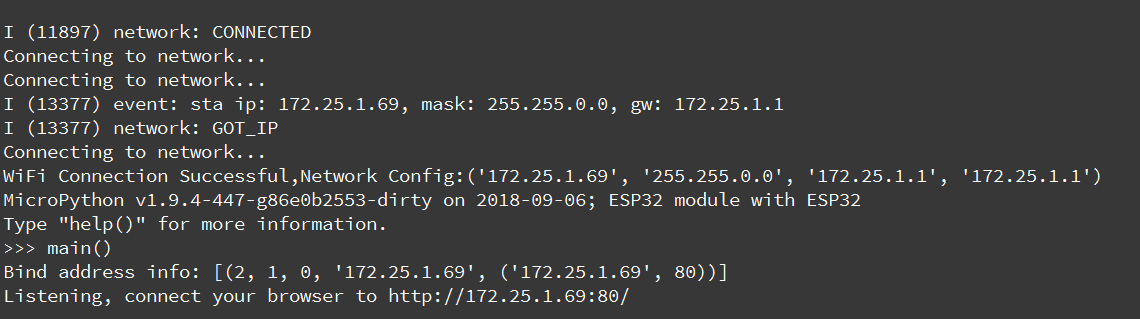
Run main in the REPL:
>>> main()
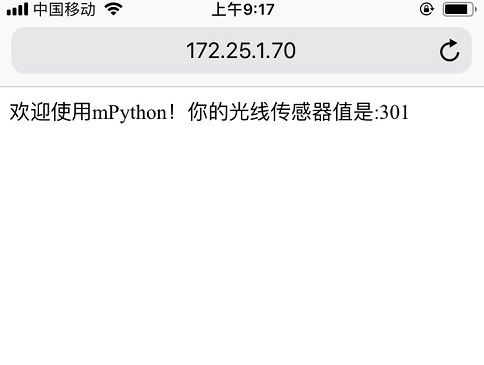
Connect your phone or laptop to the same Wi-Fi so that they are in the same local area network. Following the printed prompt or the IP shown on the OLED screen, use a browser to access the mPython Board host IP address.