Camera Tutorial
mPython Core 2.0 has a built-in camera that can be used for AI application programming education including face detection, face recognition, QR code recognition, and other image-based applications.
Model types:
Face Detection: A model for detecting faces. It can detect multiple faces simultaneously and obtain the position of faces in the frame, as well as the coordinates of key facial features such as eyes, nose, and mouth.
Face Recognition: An AI model for identifying specific individuals. It can also detect the position of faces in the frame and obtain the coordinates of key facial features such as eyes, nose, and mouth.
QR Code Recognition: Used to recognize QR codes or barcodes, capable of obtaining QR code content and barcode content.
Motion Detection: Used to detect whether there is a person moving in the frame or whether the scene is changing.
Cat and Dog Detection: A model for detecting whether the subject is a cat or a dog. It can recognize multiple cats or dogs simultaneously.
Face Detection
Print the number of faces to the console.
Graphical code
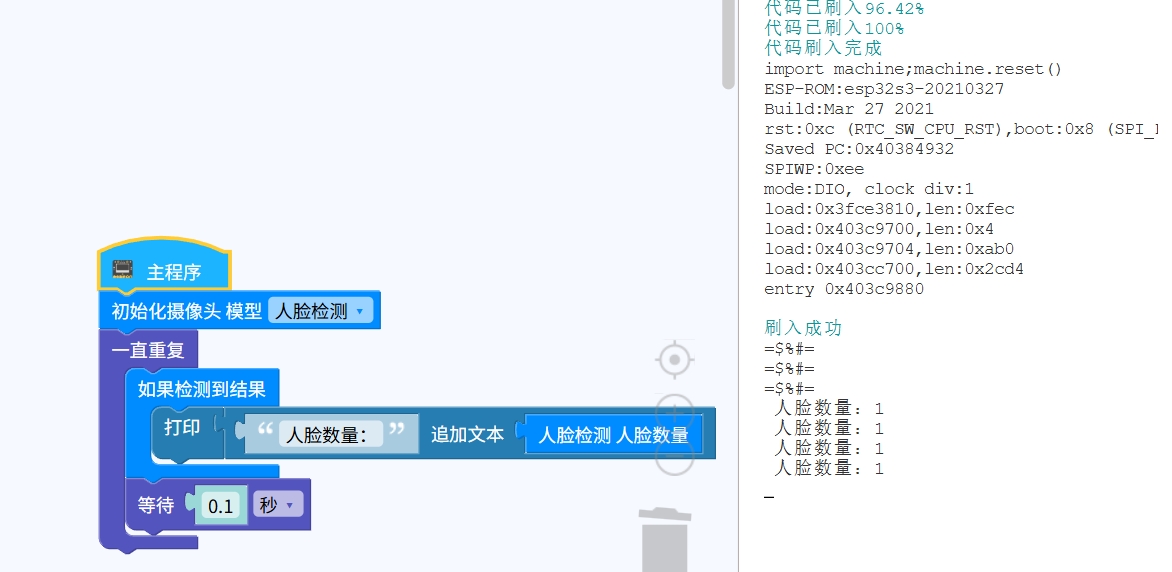
Graphical code
Python code
# Import required libraries
from mpython import *
import AIcamera
import time

# Set detection flag variable for data update
isDetect = False

# Detection callback
def cb(_):
    global isDetect
    isDetect = True # Set flag to True when a face is detected

# Set up the model
AIcamera.init(AIcamera.FACE_DETECTION, cb)

while True:
    if isDetect: # When flag is True, detection occurred
        # Get detection result and assign to res variable
        res = AIcamera.get_result()
        print('Face count: ' + str(len(res)))
        isDetect = False # Clear detection flag
    time.sleep(0.1)
Note
box is the face position, with the top-left corner coordinates (x1, y1) and bottom-right corner coordinates (x2, y2) of the face bounding boxkeypoint contains keypoints: left mouth corner (a0, a1), right mouth corner (a2, a3), nose (a4, a5), left eye (a6, a7), right eye (a8, a9)Face Recognition
Print the face name (assuming Zhang San and Li Si are enrolled), face confidence, and face position to the console.
Graphical code
[1] Enrolling faces
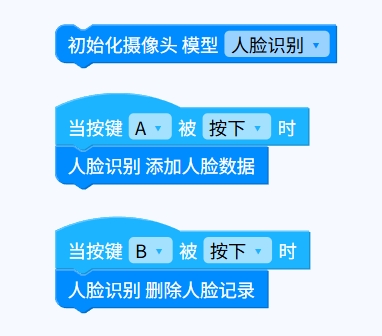
Graphical code
[2] Recognizing faces
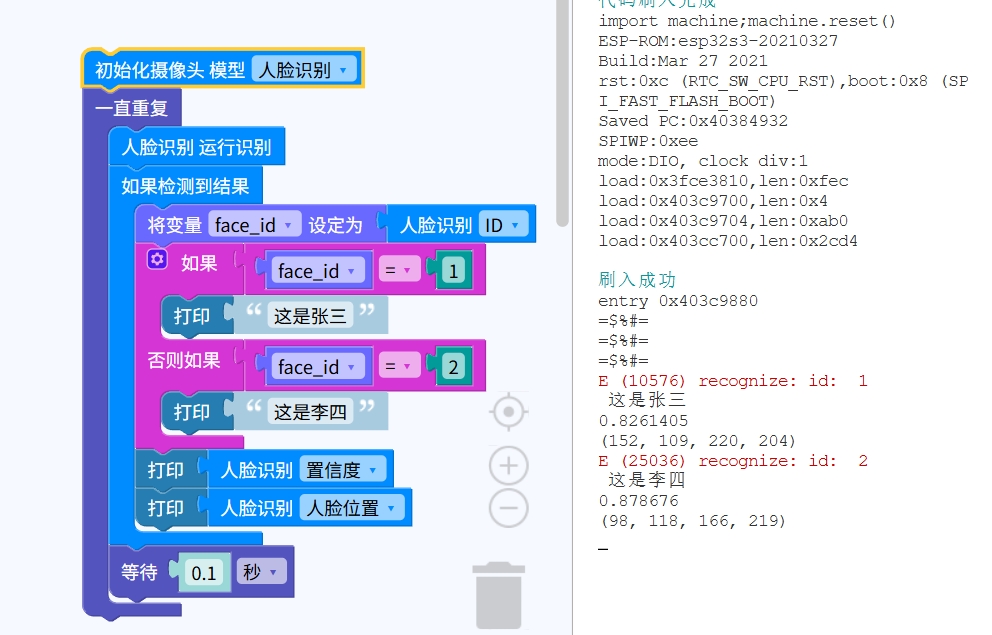
Graphical code
Python code
[1] Enrolling faces
# Import required libraries
from mpython import *
import AIcamera

# Set flag variable for data update
isDetect = False

# Set up the model
AIcamera.init(AIcamera.FACE_RECOGNITION, lambda _: None)

# Set button A callback to enroll face data when pressed
def on_button_a_pressed(_):
# Perform face enrollment
AIcamera.send_command(AIcamera.ENROLL)

# Set button B callback to delete face data when pressed
def on_button_b_pressed(_):
# Perform face deletion
AIcamera.send_command(AIcamera.DELETE)

# Bind A/B button events
button_a.event_pressed = on_button_a_pressed
button_b.event_pressed = on_button_b_pressed
Note
[2] Recognizing faces
# Import required libraries
from mpython import *
import AIcamera
import time

# Set flag variable for data update
isDetect = False

# Recognition callback
def cb(_):
    global isDetect
    isDetect = True # Set flag to True when a face is recognized

# Set up the model
AIcamera.init(AIcamera.FACE_RECOGNITION, cb)

while True:
    # Run recognition
    AIcamera.send_command(AIcamera.RECOGNIZE)
    if isDetect: # When flag is True, recognition occurred
        # Get recognition result and assign to res variable
        res = AIcamera.get_result()
        face_id = res.get('id')
        if face_id == 1:
            print('This is Zhang San')
        elif face_id == 2:
            print('This is Li Si')
        print('Confidence: ' + str(res.get('Similarity')))
        print('Face position: ' + str(res.get('box')))
        isDetect = False # Clear recognition flag
    time.sleep(0.1)
Note
box is the face position, with the top-left corner coordinates (x1, y1) and bottom-right corner coordinates (x2, y2) of the face bounding boxSimilarity is the confidence levelkeypoint contains keypoints: left mouth corner (a0, a1), right mouth corner (a2, a3), nose (a4, a5), left eye (a6, a7), right eye (a8, a9)QR Code Recognition
Control a light on and off by recognizing QR codes.
Graphical code
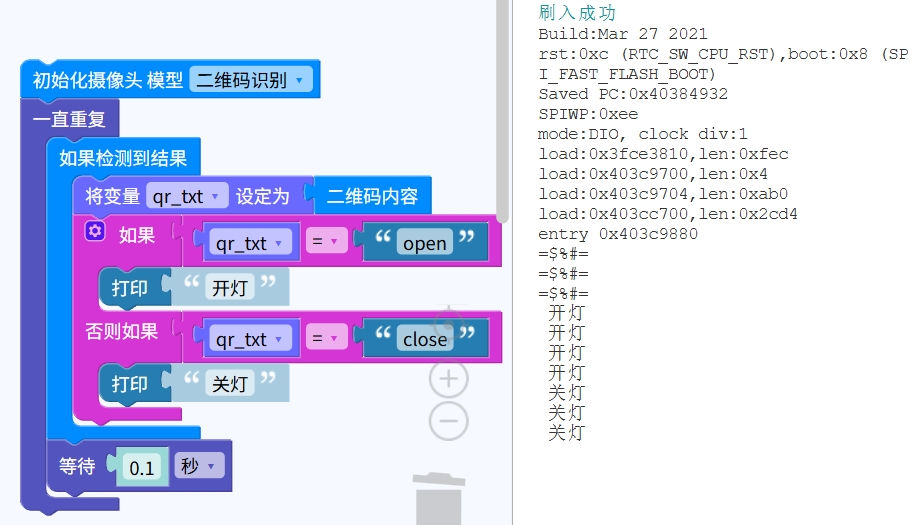
Graphical code
Python code
# Import required libraries
from mpython import *
import AIcamera
import time

# Set recognition flag variable for data update
isDetect = False

# Recognition callback
def cb(_):
    global isDetect
    isDetect = True # Set flag to True when a QR code is recognized

# Set up the model
AIcamera.init(AIcamera.CODE_SCANNER, cb)

while True:
    if isDetect: # When flag is True, recognition occurred
        try:
            # Get recognition result and assign to qr_txt variable
            qr_txt = AIcamera.get_result()
            if qr_txt == 'open':
                print('Light on')
            elif qr_txt == 'close':
                print('Light off')
        except: pass
        isDetect = False # Clear recognition flag
    time.sleep(0.1)
Note
Get the recognition result. The result is the QR code content as a string type.
Motion Detection
Detect whether there is motion and print the motion status to the console.
Graphical code
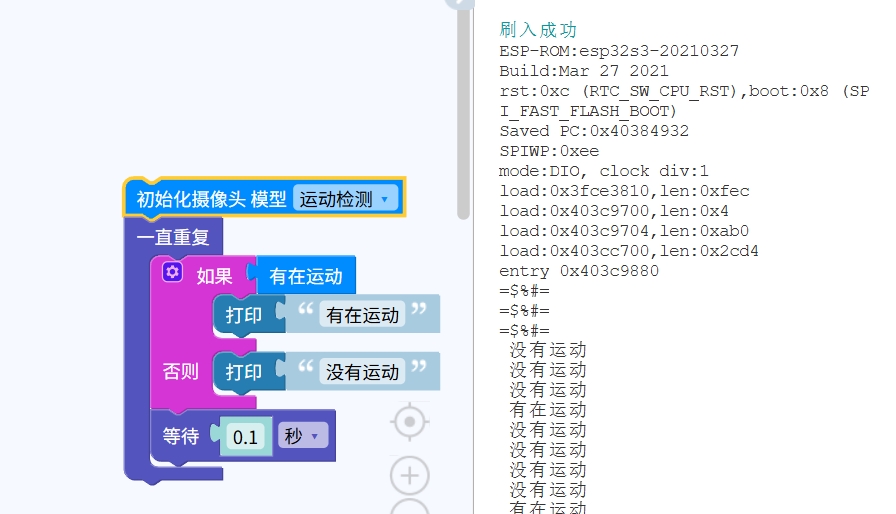
Graphical code
Python code
# Import required libraries
from mpython import *
import AIcamera
import time

# Set detection flag variable for data update
isDetect = False

# Detection callback
def cb(_):
    global isDetect
    isDetect = True # Set flag to True when motion is detected

# Set up the model
AIcamera.init(AIcamera.MOTION_DEECTION, cb)

while True:
    if isDetect: # When flag is True, motion detected
        print('Motion detected')
        isDetect = False # Clear detection flag
    else:
        print('No motion')
    time.sleep(0.1)
Cat and Dog Detection
Print the number of cat faces to the console.
Graphical code
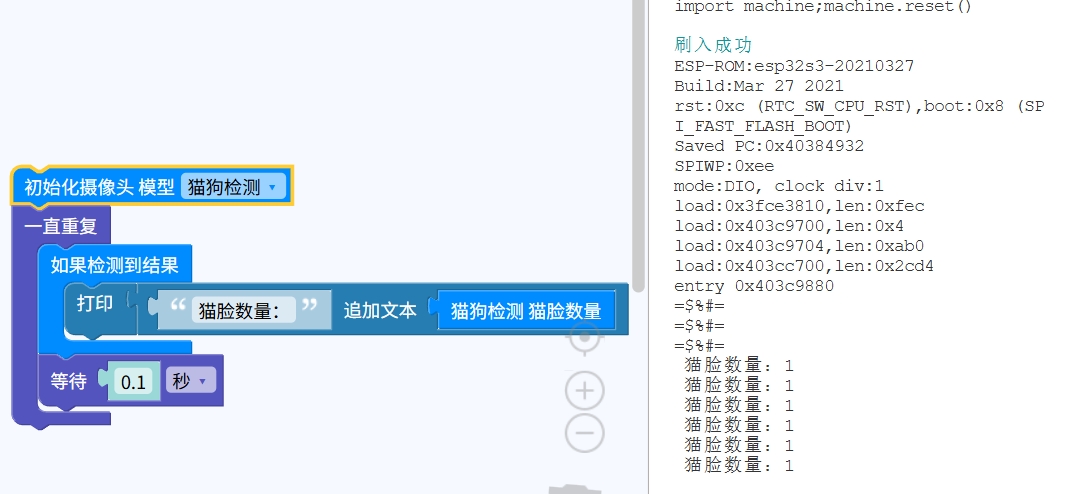
Graphical code
Python code
# Import required libraries
from mpython import *
import AIcamera
import time

# Set detection flag variable for data update
isDetect = False

# Detection callback
def cb(_):
    global isDetect
    isDetect = True # Set flag to True when a cat face is detected

# Set up the model
AIcamera.init(AIcamera.CAT_FACE_DETECTION, cb)

while True:
    if isDetect: # When flag is True, detection occurred
        # Get detection result and assign to res variable
        res = AIcamera.get_result()
        print('Cat face count: ' + str(len(res)))
        isDetect = False # Clear detection flag
    time.sleep(0.1)
Note
box is the cat/dog face position, with the top-left corner coordinates (x1, y1) and bottom-right corner coordinates (x2, y2) of the face bounding box