Accelerometer
The accelerometer can measure acceleration caused by gravity. During acceleration, the sensor measures the inertial force on the mass block and uses Newton’s second law to obtain the acceleration value. The accelerometer on the mPython Board can measure acceleration in the range of -2g to +2g.
The mPython Board measures along 3 axes. Each axis measurement is a positive or negative number. The more the positive axis approaches the direction of gravitational acceleration, the more the value increases in the positive direction; conversely, it decreases in the negative direction. When the reading is 0, it indicates the device is placed “level” along that specific axis.
X - Tilt forward and backward.
Y - Tilt left and right.
Z - Flip up and down.
Before use, import the mpython module:
from mpython import *
Get acceleration for X, Y, Z axes:
x1 = accelerometer.get_x()
y1 = accelerometer.get_y()
z1 = accelerometer.get_z()
Note
Use accelerometer.get_x() to get 3-axis acceleration. The methods for getting 3-axis acceleration are get_x(), get_y(), and get_z() respectively.
Each axis measurement is a positive or negative number depending on direction, representing the value in units of g.
You can try placing the mPython Board in the following orientations and observe the 3-axis data:
Flat on table –(0,0,-1)
Flipped flat on table –(0,0,1)
Bottom edge vertical on table –(1,0,0)
Left edge vertical on table –(0,1,0)
Note
Notice any pattern? When gravitational acceleration aligns with the accelerometer axis direction, it equals 1g of Earth’s gravitational acceleration. The positive direction is +1g, the opposite direction is -1g. If you shake the mPython Board vigorously, you will see the acceleration reach ±2g, because the maximum measurement value of this accelerometer is ±2g.
Level Ball
When the mPython Board is detected tilting in the X and Y axis directions (range -1g to +1g), the X and Y axis offset values (acceleration values, range -1 to 1) are mapped to X coordinates (range -64 to 64) and Y coordinates (range 32 to -32) with the set center point as the origin:
if y<=1 and y>=-1:
    offsetX=int(numberMap(y,1,-1,-64,64))
if x<=1 and x>=-1:
    offsetY=int(numberMap(x,1,-1,32,-32))
Note
numberMap(inputNum, bMin, bMax, cMin, cMax) is a mapping function. inputNum is the variable to map, bMin is the minimum value to map, bMax is the maximum value to map, cMin is the mapped minimum value, cMax is the mapped maximum value.
Level ball movement on X, Y coordinates: level ball position = center point + acceleration offset:
move_x=Center_x+offsetX
move_y=Center_y+offsetY
If the level ball moves to the center position, the green LED lights up; otherwise, the LED is off:
if offsetX==0 and offsetY==0:
    rgb.fill((0,10,0))          # Green LED on when level ball is at center, brightness 10
    rgb.write()
else:
    rgb.fill((0,0,0))           # LED off when level ball is not at center
    rgb.write()
Calculate the Tilt Angle of the mPython Board
 1# Calculate the tilt angle between the Y axis and the horizontal plane from the Y-axis acceleration
 2from mpython import*
 3from lv_gui import *
 4from math import acos,degrees
 5
 6
 7gui = GUI()
 8while True:
 9    y=accelerometer.get_y()
10    if y<=1 and y>=-1:
11        rad_y=acos(y)
12        deg_y=90-degrees(rad_y)
13        gui.fill(type=0)
14        gui.draw_label(text=str('%.2f°' %deg_y), row=1, color=0xffffff, wrap=False)
15        gui.update()
16
17
18
Before use, import the mpython module and the acos and degrees functions from the math module:
from mpython import *
from math import acos,degrees
Get X-axis acceleration:
x = accelerometer.get_x()
Assuming the mPython Board’s reference horizontal plane is the table surface, during tilting, the Y-axis remains parallel to the table and its angle does not change (always 0 degrees). What changes is the angle between the X-axis and the table, as well as the angle between the Z-axis and the table, and these angle changes are the same. For easier analysis, if we look down from the Y-axis direction, the problem simplifies to a 2D relationship between X and Z axes only. Assume at a certain moment the mPython Board is in the following state:
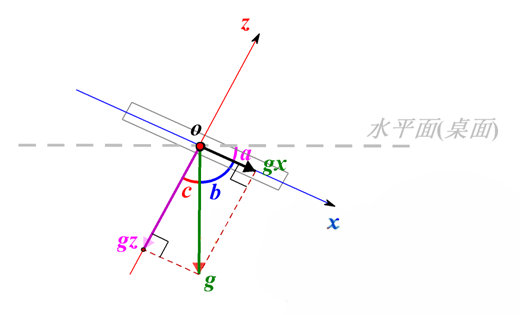
In this diagram, the Y-axis has been simplified to coincide with the coordinate system origin O. Let’s see how to calculate the tilt angle of the mPython Board, which is the angle a with the table surface. g is gravitational acceleration; gx and gz are the components of g on the X-axis and Z-axis respectively.
Using the inverse cosine theorem, calculate the radian value of angle b:
rad_x=acos(x)
Calculate the angle in degrees, i.e., angle a = angle c = 90 degrees - angle b:
deg_x=90-degrees(rad_x)
Note
The acos() function returns the inverse cosine radian value.
The degrees() function converts radians to degrees.