parrot — mPython expansion board driver
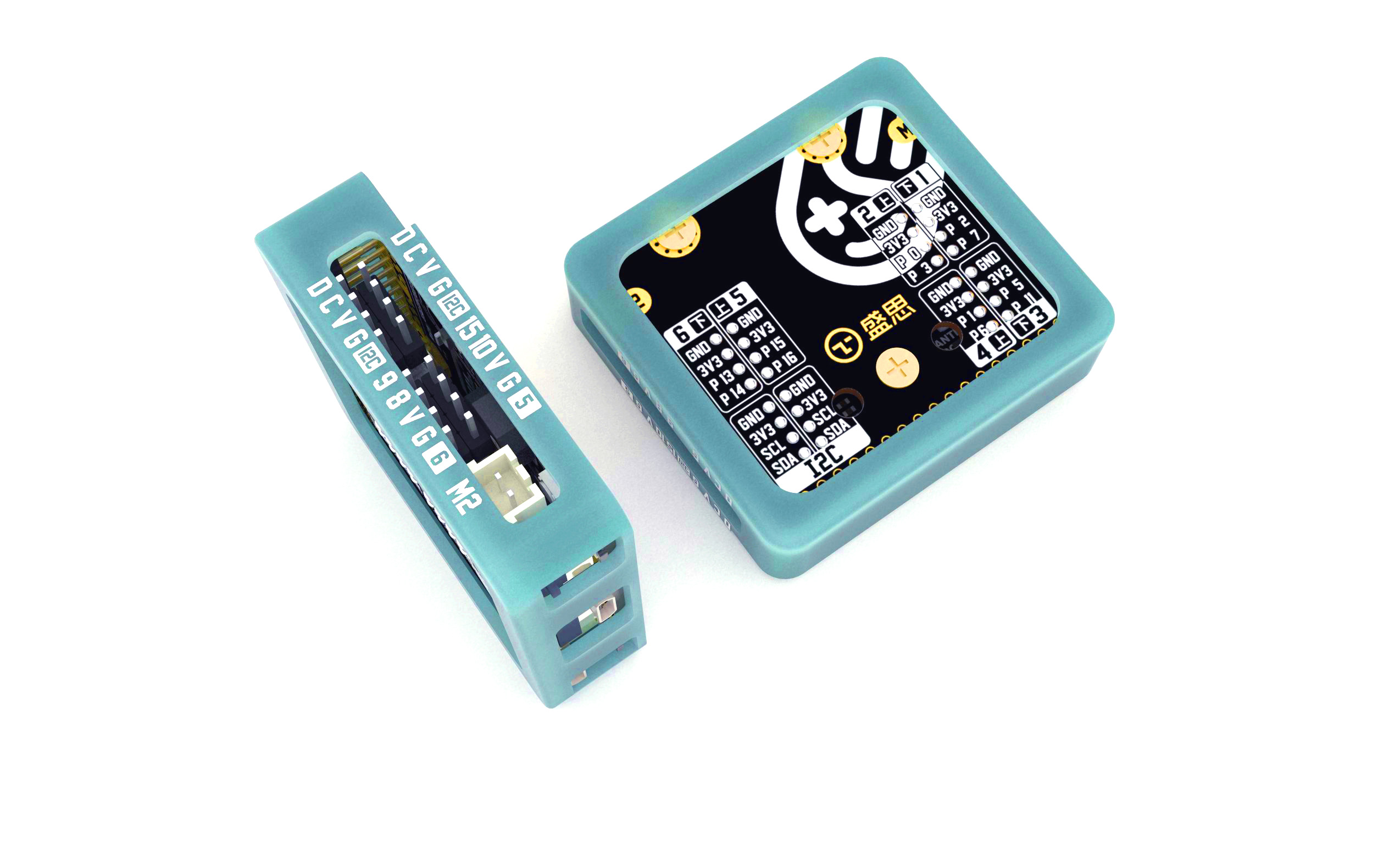
The mPython expansion board parrot is derived from the mPython Board. It is compact and easy to carry. It is an IO pin expansion board that supports motor driving, voice playback, speech synthesis and other functions, and can expand 12 IO interfaces and 2 I2C interfaces. This library provides motor driving, LED driving and other functions for the mPython expansion board.
Motor control I2C communication protocol data format:
Type |
Command |
motor_no |
speed(int) |
Motor control |
0x01 |
0x01/0x02 |
-100~100 |
When ‘speed’ is negative, it reverses; when positive, it rotates forward.
- parrot.MOTOR_1 = 1
M1 motor number, 0x01
- parrot.MOTOR_2 = 2
M2 motor number, 0x02
- parrot.set_speed(motor_no, speed)
Set motor speed
- parrot.get_speed(motor_no)
Get motor speed
- parrot.led_on(no, brightness=50)
Turn on LED. The motor interface can also control LEDs in addition to driving motors.
- parrot.led_off(no)
Turn off LED.
- Parameters:
no (int) – Motor control number, can use
MOTOR_1,MOTOR_2, or directly input the motor number.
- parrot.get_battery_level()
Get the voltage of the expansion board.
- Returns:
Returns battery level in mV.
- class parrot.IR_encode
IR encoding class
- encode_raw(carry_freq, len, repeat_pos, code, data)
Create arbitrary encoding.
- Parameters:
carry_freq (int) – Carrier frequency in Hz.
len (int) – Total code count for a single transmission including repeat code
repeat_pos (int) – Repeat code position
code (int) – Code list, 16 members, recording 8 groups of different high/low level waveforms
data (char) – Encoding waveform data, maximum 64 bytes
- Returns:
Returns the encoded IR pulse data buff
- class parrot.IR
Abstract class for IR transceiver, used for IR transmission and learning.
- send(buff, repeat_en=0)
Send IR pulse data buff
- Parameters:
buff (bytes) – Can be the buff returned by
IR_encode.encode_nec, or the learned buff.repeat_en (init) – Repeat code. Used to indicate a long key press. When repeat_en is 1, repeat codes will be sent continuously until
stop_sendstops transmission.
- stop_send()
Stop sending. After sending repeat codes, use this function to stop transmission.
- learn(wait=True)
IR learning. By default wait is True, which makes this a blocking function. After learn() starts, hold down the button of the learning target within 5 seconds. When learning is complete, it returns the result: True for success, False for failure. When wait is False, it is non-blocking and does not return a result.
- Parameters:
wait (bool) – Whether to block.
- Returns:
bool type, returns result
- get_learn_data()
Returns the IR encoding data after learning. This function must be used after the
learnfunction.- Returns:
Returns the encoded IR pulse data buff
 1import parrot
 2from mpython import sleep_ms,sleep
 3
 4# Speed range can be set from -100 to 100.
 5# Positive value: motor forward; Negative value: motor reverse;
 6
 7
 8while True:
 9
10    # Set forward speed 100
11    parrot.set_speed(parrot.MOTOR_1,100)
12    parrot.set_speed(parrot.MOTOR_2,100)
13    print("current motor speend: %d,%d" %(parrot.get_speed(parrot.MOTOR_1),parrot.get_speed(parrot.MOTOR_2)))    #Get motor speed
14    sleep(5)
15    # Set reverse speed 100
16    parrot.set_speed(parrot.MOTOR_1,-100)
17    parrot.set_speed(parrot.MOTOR_2,-100)
18    print("current motor speend: %d,%d" %(parrot.get_speed(parrot.MOTOR_1),parrot.get_speed(parrot.MOTOR_2)))    #Get motor speed
19    sleep(5)
20    # Stop
21    parrot.set_speed(parrot.MOTOR_1,0)
22    parrot.set_speed(parrot.MOTOR_2,0)
23    print("current motor speend: %d,%d" %(parrot.get_speed(parrot.MOTOR_1),parrot.get_speed(parrot.MOTOR_2)))    #Get motor speed
24    sleep(2)
 1import parrot
 2import time
 3
 4ir_code = parrot.IR_encode()
 5
 6ir = parrot.IR()
 7ir_buff = ir_code.encode_nec(1, 85)
 8while True:
 9    ir.send(ir_buff, 1)
10    time.sleep(3)
11    ir.stop_send()
12    time.sleep(3)
 1from mpython import *
 2import parrot
 3import time
 4
 5def on_button_a_pressed(_):
 6    global data
 7    ir.learn()
 8    time.sleep(4)
 9    if 0 == ir.__get_learn_status():
10        data = ir.get_learn_data()
11        print(data)
12    else:
13        print('Learned nothing...')
14
15button_a.event_pressed = on_button_a_pressed
16
17def on_button_b_pressed(_):
18    global data
19    print(data)
20    ir.send(data, 0)
21
22button_b.event_pressed = on_button_b_pressed
23
24ir = parrot.IR()
25data = None