audio — Provides audio playback and recording functions
This module provides audio recording and playback functions, using pins P8 and P9 as the audio decoding output. Since the mPython Board has no integrated speaker, it cannot play audio sources directly. You can use an expansion board with an integrated speaker, or connect P8 and P9 yourself to an amplifier speaker.
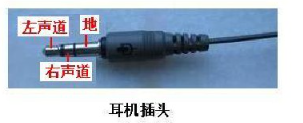
How to connect 3.5mm headphones to the mPython Board:
P8 – Left channel
P9 – Right channel
GND – GND
Functions
Basic audio functions
Playback
- audio.player_init()
Initialize audio playback and allocate a buffer for audio decoding.
- audio.play(url)
Play local or network audio. Currently only wav and mp3 formats are supported.
You can play MP3 audio from the file system, or MP3 audio resources from the network. Playing a local mp3 file is limited by the MicroPython file system and RAM size, so files larger than 1M are basically very hard to download. Therefore the audio file size is limited and should be as small as possible. When playing network MP3 audio, you must connect to the network first, and the URL must be a complete address, such as “http://wiki.labplus.cn/images/4/4e/Music_test.mp3”. It returns the decoding status: when it is 0, the audio decoding command can be accepted; when it is 1, it is currently decoding and cannot respond.
url(str): The audio file path, of string type. It can be a local path or a URL address on the network.
 1import audio                                    # Import audio
 2from mpython import wifi                        # Import wifi
 3
 4mywifi=wifi()                                   # Instantiate wifi class
 5mywifi.connectWiFi('ssid','password')           # Connect to Wi-Fi network
 6
 7audio.player_init()                                   # Playback initialization
 8audio.play('music.mp3')                                      # Local audio decoding
 9audio.play("http://wiki.labplus.cn/images/4/4e/Music_test.mp3")          # Play network audio URL
10audio.player_deinit()                            # Playback finished, release resources
- audio.set_volume(vol)
Set the audio volume.
vol: Volume setting, range 0~100
- audio.stop()
Stop audio playback.
- audio.pause()
Pause audio playback.
- audio.resume()
Resume audio playback, used to resume playing after a pause.
- audio.player_status()
Used to get whether the system is in the audio playback state. It returns 1 if playback is in progress, and 0 if playback has ended and it is idle.
- audio.player_deinit()
Release the buffer after audio playback ends.
Recording
- audio.recorder_init()
Initialize recording.
- audio.record(file_name, record_time=5)
Record audio and store it in wav format. The audio parameters are an 8000Hz sampling rate, 16-bit, mono.
file_name- The storage path of the wav filerecord_time- Recording duration, default 5 seconds. The recording duration is limited by the file system space; the maximum duration depends on the actual situation.
- audio.recorder_deinit()
Release resources after recording ends.
Example - Recording:
import audio
from mpython import *

audio.recorder_init()
rgb[0] = (255, 0, 0)  # Use the LED to indicate the start and end of recording
rgb.write()
audio.record('test.wav',5)
rgb[0] = (0, 0, 0)
rgb.write()
audio.recorder_deinit()